 Runtime
SAP Exchange Infrastructure runtime serves the exchange of messages as per the configured business processes. As the graphic below illustrates, the process of transferring a message involves various components:
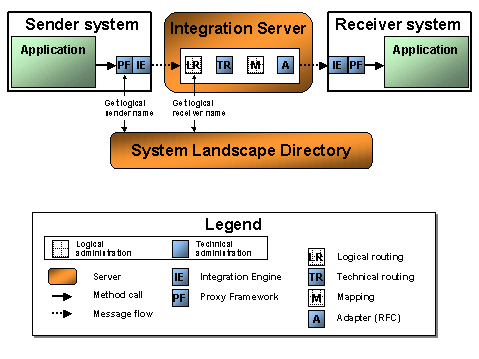
The graphic shows a connection between two application systems using proxies. However, the proxies alone are not able to establish a connection between a sender and a receiver. Messages can only be exchanged once the logical business process has been configured (also when using adapters):
· The connection must be set up in logical routing (LR)
· The connection must have an end point (TR: Technical Routing), and logon data, if applicable
· If you have used a mapping, you must have saved and assigned it (M). If you are using adapters you must execute a mapping between the XML format that the adapter gets or expects and the XML format that generates or expects a proxy.

You want to send a message to an RFC module using an ABAP outbound proxy. Therefore, you require a mapping from proxy XML to RFC XML.
The contents are defined partly during development and are then configured later by a consultant.
There are also settings to be made that are purely administrative in nature. To be able to forward the message, the proxy framework must know the address of the Integration Engine. The framework acquires this information as follows:
...
1. The proxy framework fetches the System Landscape Directory (SLD) address from the exchange profile. The SLD contains all business systems that belong to the Integration Server.
2. The proxy framework sends the SLD a technical ID for the sender system. Once this ID is entered in the SLD and the corresponding associations are available, the proxy framework receives the name of the sender business system and the address of the corresponding Integration Server as a response.
3. The proxy framework can now specify the logical business system as the sender in the message and forward it to the Integration Server.

This process is similar when using an adapter.
Not only the Proxy Framework accesses the SLD, but also components of the Integration Server, for example, during logical routing. There should be a contact person for any queries that the development team might have regarding administrative settings. See the Configuration Guide for a description on how to configure the servers within the Exchange Infrastructure for runtime. The configuration guide is available on the Service Marketplace. See http://service.sap.com/instguides.
Transactions for troubleshooting are located in the area menu Integration Engine - Monitoring (transaction SXMB_MONI on the Integration Server). Also see: Monitoring XML Messages.
