 Customizing for Follow-up Workflow After Creation of Interaction Record
Procedure
In order to use the workflow function in SAP Multichannel Foundation for Utilities and Public Sector, you must make the following settings in Customizing:
Switch on the function
By default, the feature is switched off in the delivered Customizing. To switch it on, do the following:
In transaction SPRO, under
Customer Relationship Management
, choose
Industry-Specific Solutions

Utilities Industry
SAP Multichannel Foundation for Utilities
Maintain Settings for Business Process
 .
.Select the business process
Create Interaction Record
, and make the following settings:Entity Name
:InteractionRecord
Parameter
:FollowUpWorkFlow
SEQNO
: 1Parameter Value
: X
Define input parameters table for the workflow
A follow-up workflow is triggered with an input parameters table, which contains name and value pairs of variables. You can add any attribute belonging to the
InteractionRecord
Entity to the workflow input parameters table. The fields in the input parameters table are defined by the parameterFollowUpWorkFlowInputVariable
under the business processCreate Interaction Record
.By default, the example workflow 56800005 (
UMC_IR_CRT
) takes the interaction record ID (TRANSACTION_ID
) and creation timestamp (TIMESTAMP
) as input parameters as illustrated in the following table:Entity Name
Parameter
SEQNO
Parameter Value
InteractionRecord
FollowUpWorkFlowInputVariable
1
TRANSACTION_ID
InteractionRecord
FollowUpWorkFlowInputVariable
2
TIMESTAMP
Maintain Event Type Linkage for the business object
 Note
NoteThis Customizing activity is not delivered by SAP. You are required to maintain this activity by using transaction SWETYPV, depending on the workflow template you are using.
End of the note.The ID of the standard workflow template is 56800005. When this standard workflow is used, the following entries must be maintained in the event linkage for the
REQUESTRECEIVED
Event in Business Object BUS5000126 as follows:Field Name
Value
Object Category
BOR Object Type
Object Type
BUS5000126
Event
REQUESTRECEIVED
Receiver Type
WS56800005
Receiver Call
Function Module
Receiver Function Module
SWW_WI_CREATE_VIA_EVENT_IBF
Check Function Module
CRM_IU_UMC_CHK_ISR_WF_CRT_IR
Receiver Type Function Module
Leave blank
Destination of Receiver
Leave blank
Event Delivery
Using tRFC (Default)
Linkage Activated
Checkbox must be enabled
Behavior Upon Error Feedback
System defaults
Receiver Status
No errors
NoteThe receiver type is the ID of the workflow template that is to be used, starting with the prefix WS.
You are required to implement your own checking function module to decide which workflow template is to be triggered.
End of the note.Checking Function
Since the
REQUESTRECEIVED
Event in the Business Object BUS5000126 is used to trigger multiple workflows, the checking functionCRM_IU_UMC_CHK_ISR_WF_CRT_IR
is designed for filtering out other workflows.Currently, the standard checking function only checks the workflow type in the workflow container element
WorkflowType
. It is also possible to use other workflow container elements to check whether the workflow is for following up with the customer after they create a message. You can do this by implementing your own check function.The following example illustrates how to use additional attributes of the entity
InteractionRecord
in the checking function. Example
A customer wants to check the Reason ID of the entity
InteractionRecord
in the checking function; the follow up workflow is triggered with a specific Reason Code.You need to do the following:
Add this attribute to the input parameters table of the workflow in Customizing. In the Customizing that is delivered, only the interaction record ID (
TRANSACTION_ID
) and creation timestamp (TIMESTAMP
) are defined as input parameters. In this case, the reason ID (REASON_ID
) needs to be added as follows:Entity Name
Parameter
SEQNO
Parameter Value
InteractionRecord
FollowUpWorkFlowInputVariable
1
TRANSACTION_ID
InteractionRecord
FollowUpWorkFlowInputVariable
2
TIMESTAMP
InteractionRecord
FollowUpWorkFlowInputVariable
3
REASON_ID
When the interaction record is created, you need to ensure that the Reason ID is set correctly. The Reason ID is automatically populated in the workflow container table
InputVariables
.In the check function, add the following pseudo-code to check the Reason ID:
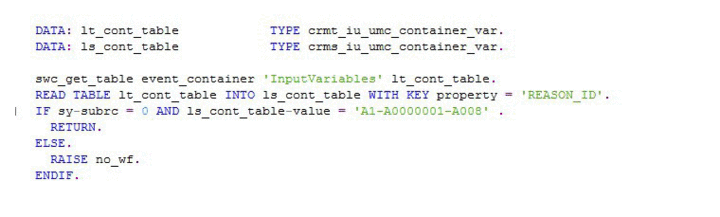
End of the example.The workflow is only triggered in the case the checking function module does not return an exception when an interaction record has a reason
A1-A0000001-A008
(reason code for customer maintenance). This allows you to customize different types of workflows for different types of interaction records. This feature might be useful when you do not need to create a second follow-up workflow for an interaction record created due to an Internet Service Request (CreateRequest
– Function Import).