SAP Fiori Integration into PFCG
You can integrate SAP Fiori apps and the SAP Fiori launchpad into transaction PFCG (Role Maintenance) and make them consumable in the SAP Business Client.
-
User Interface Add-On 2.0 SP00 for SAP NetWeaver or
-
Component SAP_UI 750 SP00
-
Non-standalone apps
The majority of SAP Fiori apps fall into this category. These apps must first be configured in the SAP Fiori Launchpad Designer and transaction PFCG; for more information, search for the topics Using the Launchpad Designer, Configure Custom Catalogs, Groups, Tiles and Target Mappings under the SAP Fiori Launchpad topic in the SAP NetWeaver documentation in the SAP Help Portal http://help.sap.com/netweaver/. These apps use intent-based navigation that requires the use of an Intent, a Semantic Object and an Action.
-
Standalone apps
There is a small minority of standalone SAP Fiori apps which require simple configuration only in transaction PFCG (there is no need for any SAP Fiori launchpad system/user configuration on the ABAP front-end server creating catalogs, groups, tiles, etc.)
For an overview of SAP Fiori apps released to run in standalone mode when integrated in SAP Portal, see SAP Note 2103156
 .
. For more information on running apps standalone, see Running an Application Standalone in the SAP NetWeaver documentation in the SAP Help Portal http://help.sap.com/netweaver/.
For general information about a SAP Fiori app, go to the SAP Fiori apps reference library and select the app you are interested in. For configuration details, switch to the Implementation Information view and expand the Configuration section under the Technical Configuration section.
With this version of the SAP Business Client, you can integrate all SAP Fiori apps via the PFCG menu. Additionally, you can use the SAP Fiori launchpad as a single point of access for the SAP Fiori apps.
- On the Menu tab, select SAP Fiori App from the Insert Node dropdown list box.
- In the SAP Fiori App dialog box, do
ONE of the following options:
-
Choose SAP Fiori Launchpad
At runtime, the SAP Fiori launchpad home page is displayed, allowing the user to choose his/her app.
-
Choose Intent and complete the fields Semantic Object and Action, and enter the application-specific parameter information as follows:
-
Non-Standalone Apps
For the required information, see the SAP Fiori Apps Reference Library (details above).
Standalone Apps
For this type of SAP Fiori app, you must enter the following information:-
Semantic Object = Shell
-
Action = runStandaloneApp
-
Parameters are used to identify the app:
-
sap-ushell-SAPUI5.Component = Name of SAPUI5 component, including the namespace, for example: hcm.emp.myleaverequests
-
sap-ushell-url = URL on the server, of the app’s resource file, for example: /sap/bc/ui5_ui5/sap/hcm_lr_cre
-
-
-
-
-
Choose Continue to create the new entry.
NoteOnce you have created an entry, you cannot edit it. You must delete the current entry and create a new one.
When testing, note that the context menu option Execute does not take into account the target system but uses the local system and the default SAP Fiori launchpad URL instead.
The following figure displays the details of a standalone SAP Fiori app in the menu tree. Note that the text required in the input fields of the SAP Fiori App dialog box is described in the procedure above (step 3).
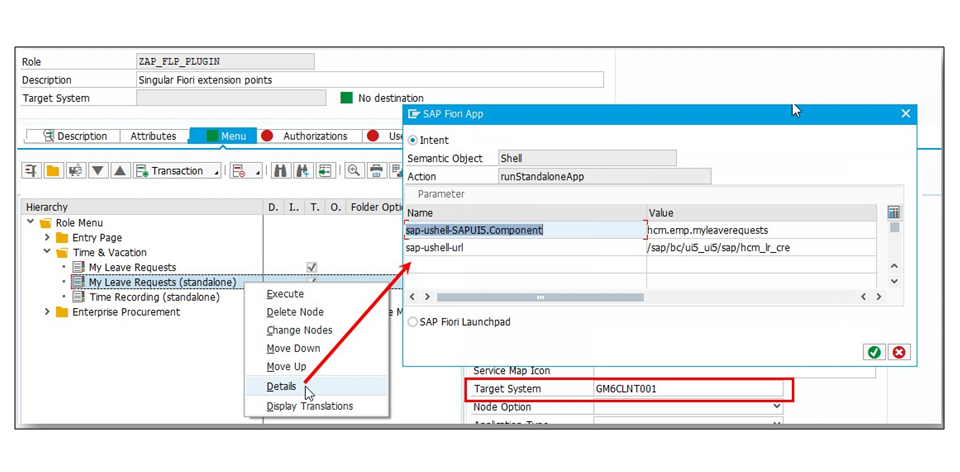
If you want to insert a SAP Fiori app, you must create RFC destinations in transaction SM59,
specifying server addresses, ports, logon information, and in particular, the
SAP Fiori launchpad start-up URL (for more information about this, see the
SAP Business Client space on
SCN Configuring Remote Systems in SM59). The ABAP
connection must be specified in the Target System field
(see screenshot).

In the above example, system GM6, client 001 is used as the ABAP front-end server/system hosting the stand-alone app. ABAP connection GM6CLNT001 contains information used for establishing SAP GUI connections (message server, port) as well as logon options (for example, client).
The HTTP connection contains server and port information as well as the relative Fiori launchpad start-up URL.