PFCG Overview
In transaction Role Maintenance (PFCG) you can configure roles. Transaction PFCG covers various aspects: the administration of authorizations and profiles as well as the definition of user menus.
In real life, a role corresponds to the work that a person does within a company or the position held, for example, a sales person or someone working in support. In transaction PFCG, roles are defined matching the real life roles that people play within a work situation. More specifically, a role within transaction PFCG is a set of transactions that persons within specific roles would need for their daily work. For example, a sales person might have a role that requires transactions to add new customers, display customer details, or to enter a new lead.
Given the existence of roles within transaction PFCG that describe the typical work persona, use transaction User Maintenance (SU01) to assign these roles to specific users. A user in the system can have any number of roles assigned, which reflects the real work that the person does within the company.
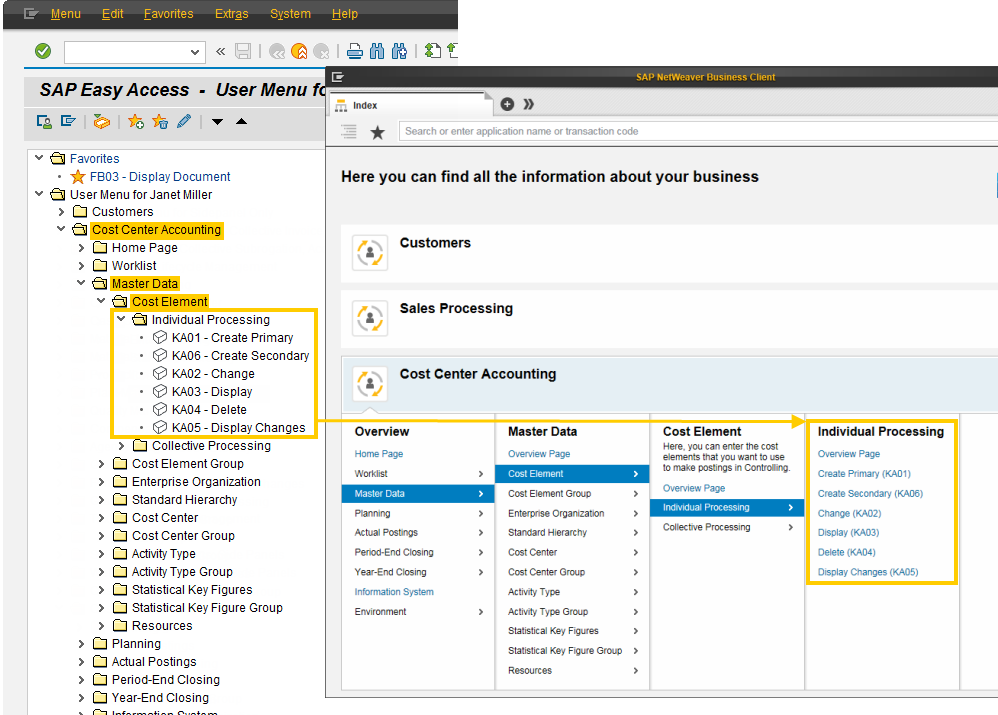
Given the roles in transaction PFCG, the SAP Easy Access menus are displayed directly after logging on with SAP GUI. These are effectively the menu trees as expressed in one or more roles for each user. This allows the user to quickly start the relevant transactions for their daily work.
NWBC builds on this same PFCG infrastructure in the ABAP system. The NWBC runtime retrieves all roles assigned to a specific user and makes them available to the shell. The shell uses exactly the same role information to show the user the possible transactions that might help them with their daily work.
For this reason, the shell in NWBC is in the first instance another expression of the SAP Easy Access menu, providing roughly the same functionality.
However, the NWBC runtime also extends the usage of transaction PFCG to make additional functionality available or to depict the configured data in a different fashion. This chapter looks at the relevant parts of transaction PFCG that are used by NWBC, and also at the additional features that can be configured within transaction PFCG for NWBC. This concept is illustrated in the following figure:
In addition to the role name and the description, only the settings on the following tab pages are relevant for the NWBC:
-
Description
-
Menu
The settings for role maintenance are slightly different in the previous SAP NetWeaver releases. For more information, see Improvements in PFCG User Interface.