
 Real-Time Data Acquisition

Purpose
Real-time data acquisition (RDA) supports tactical decision-making. It also supports operational reporting by allowing you to send data to the delta queue or PSA table in real time. You then use a daemon to transfer data into InfoProviders in the Operational DataStore layer at defined intervals. The data is stored persistently in BW.
We recommend using real-time data acquisition if you want to transfer data to BW at more regular intervals (every hour or every minute) than scheduled data transfers and you need up-to-date data to be regularly available for analysis and reporting (at least several times a day).
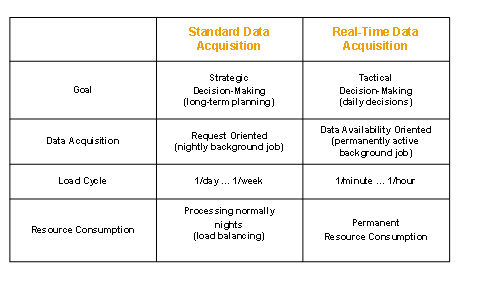
The following overview displays the differences between standard data acquisition using scheduled data requests and real-time data acquisition:
Prerequisites
● The DataSource has to support real-time data acquisition.
Web service DataSources and DataSources from SAP source systems can support real-time data acquisition. In the DataSource maintenance, the Extraction tab page shows whether the Real Time property is set.
DataSources from SAP source systems can be used for real-time data acquisition if the following conditions are met:
○ BI Content DataSources have to be delivered with the property for supporting real-time data acquisition.
○
The Real-Time-Enabl.indicator
has to be set in the generic delta settings for generic DataSources (see
 Delta Transfer to
BW).
Delta Transfer to
BW).

Note that real-time data acquisition as a property of DataSources in SAP source systems is only technically possible under the following circumstances: In the source system, the BW Service API has at least the Plug-In-Basis 2005.1 version, or for 4.6C source systems Plug-In 2004.1 SP10.
Note too that you can only use a Web service DataSource for real-time data acquisition if you have defined it in the (new) DataSource maintenance in BW.
● If you are loading data into a DataStore object, you have to use a transformation between the PSA and DataStore object when you model the data flow and use a data transfer process to update data from the PSA to the DataStore object.
Note this prerequisite if you want to load data to a DataStore object only. You can continue modeling the data flow for DataStore objects using transfer and update rules. Real-time data acquisition is not supported in this case however.
Process Flow
The graphic below illustrates the process flow for Real Time Data Acquisition:
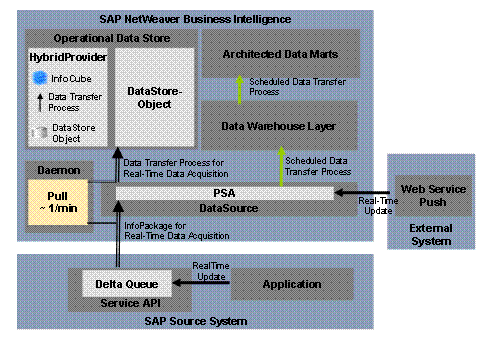
Data is loaded into BW at defined intervals and posted to the InfoProviders available for operational reporting.
Previously, it was
only possible to use real-time data acquisition to fill DataStore objects
(standard and write-optimized DataStore objects). The HybridProvider
represents another type of InfoProvider that can be filled using real-time
data acquisition. A HybridProvider consists of a DataStore object and an
InfoCube. The actual real-time update takes place in the DataStore object of
the HybridProvider. The InfoCube acts as an aggregate for the DataStore
object. It is loaded using a standard DTP generated with the HybridProvider
that updates successfully closed RDA requests. A query that is defined on a
HybridProvider refers to the data from the InfoCube (history) and from the
change log of the DataStore object (current data). This HybridProvider
architecture enables high-performance access to data during analysis and
reporting. More information:
Creating
HybridProviders.
DataStore objects that are part of a HybridProvider cannot be used independently of the HybridProvider. A DataStore object can therefore be the target in a RDA data model or a part of a HybridProvider in a RDA data model. One DataStore object cannot be both simultaneously.
To ensure that the transaction data and master data is synchronized, you can use real-time data acquisition to transfer data into InfoObjects as well as InfoProviders. The real-time transfer of attributes and texts is supported.
In the rest of this documentation, the term InfoProvider is used if the information refers to both the HybridProvider, independent DataStore objects and InfoObjects.
For real-time data acquisition, special InfoPackages and data transfer processes are used for transferring data from the source into the PSA and further updating data from the PSA into the InfoProviders. This is scheduled and executed regularly by a dedicated background process (the daemon). Data is available for analysis and reporting as soon as it has been posted to the master data tables or DataStore object (of a HybridProvider) and activated. Refresh the query display to display the current data. The query shows the time that the query was last updated by a daemon run, even if no new data was posted.
You can transfer data from the source to the BW entry layer (the PSA) in two ways:
...
● Using a Web service
The data in the source can be written to the PSA directly using the Web Service. The data transfer is therefore controlled externally without being requested in BW. An InfoPackage is only required here in order to define certain parameters for real-time data acquisition.
● Using a service API
Data from an SAP source system can be loaded into the PSA using an InfoPackage created specifically for this purpose. This is triggered when the delta queue in the source system requests data. You have to perform the initialization of the delta process for the DataSource beforehand.
The following two scenarios are possible:
○ The source system application writes the data to the delta queue.
In this case, the daemon retrieves the data without calling the extractor.
○ The application does not write data to the delta queue automatically. The extractor writes the data to the delta queue when requested by BW instead.
For extractors that transfer data synchronously from BW to the service API on request (generic extractors, for example), the daemon calls the extractor, which then writes the data to the delta queue. The data is transferred directly to BW from the delta queue.
Constraints
● You can use real-time data acquisition to fill HybridProviders, DataStore objects that you are using independently of a HybridProvider and InfoObjects (attributes and texts) with data. A two-step data transfer is supported; data is first transferred into the PSA and then into the InfoProvider. You cannot use the DataStore object as the source of a further real-time data transfer into a further InfoProviders. With real-time data acquisition, a data transfer that involves more than two steps is not possible.
● DataSources that are used for real-time data acquisition cannot be used in the delta process for standard data extraction and transfer (scheduling with standard InfoPackages) at the same time. A data transfer with RDA and a scheduled data transfer cannot be executed simultaneously in the delta process for a DataSource because there may be only one entry in the delta queue for each DataSource and target system.
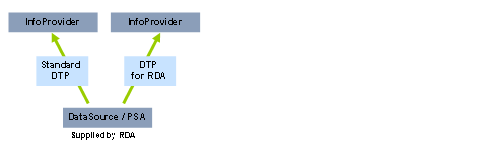
In addition to a pure RDA update and a pure standard update, the following update methods, in which both transfer mechanisms are used in parallel, are possible for data that was transferred to the PSA by real-time data acquisition:
The data is updated from the PSA to an InfoProvider with a DTP for real-time data acquisition, and to another InfoProvider with a standard DTP. The graphic below illustrates this process:
● If you load data into a standard DataStore object (also as part of a HybridProvider) with real-time data acquisition, you cannot load data into this DataStore object simultaneously using another DTP. This is because there can be only one open activation request in a DataStore object. This does not apply for write-optimized DataStore objects or InfoObjects.
Real-time data acquisition keeps an activation request open parallel to each DTP request. In a DTP request for RDA, multiple data packages can be loaded during a given time period. Each data package is activated in the DataStore object immediately after it is transferred. A further data transfer process cannot load into the same standard DataStore object as long as an activation request is open. When you model your data flow, you should therefore not use real-time data acquisition to write to a standard DataStore object into which you need to load data simultaneously with another data transfer process.
Depending on the requirements, you can still merge the data that you load with a real-time data acquisition in an InfoProvider with additional data sources.
○ Instead of a standard DataStore object, you can use a write-optimized DataStore object.
More
information:
Write-Optimized
DataStore Objects
○ You can use the DataStore object into which you load data with real-time data acquisition with a further DataStore object in a MultiProvider or InfoSet.
○ Using a process chain, you can restrict the time in which you load data into the DataStore object with real-time data acquisition. You can load data into the same DataStore object with a different data transfer process during the remainder of the time.
More information:
Controlling Real-Time Data Acquisition with Process Chains
Converting an Existing Data Flow to Real-Time Data Acquisition
If you want to integrate the transfer of data with real-time data acquisition into an existing data flow, you have two options:
● Using two different DataSources
One DataSource executes the standard data transfer, and the other DataSource transfers the data with real-time data acquisition. The data is then combined in a MultiProvider.
● Using a single DataSource
In this case, you have to replace the standard data transfer completely with a real-time data acquisition scenario.
More information:
Real-Time Data
Acquisition