
 Unit 2: Starting the Workflow Builder

Use
The Workflow Builder is the central tool for creating and editing workflows.
Procedure
Calling the Workflow Builder
...
1. Choose Tools ® Business Workflow ® Development ® Definition Tools ® Workflow Builder ® Workflow Builder.
The Workflow Builder is then launched with the workflow definition that was processed last. If the Workflow Builder has not yet been called, then an initial workflow definition is displayed.
The Workflow Builder screen is divided into the following areas.
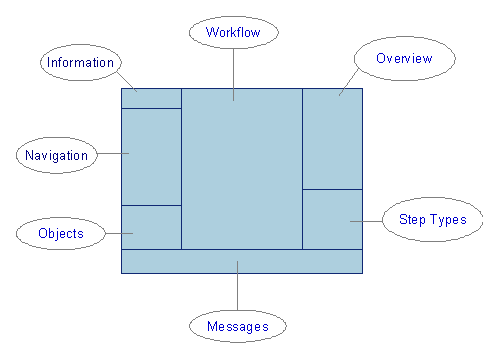
The workflow
definition is displayed in the Workflow screen area. If the
workflow is shown in display mode, the step type area is not displayed. For more
information, see
 Workflow Builder
in the SAP Business Workflow
documentation.
Workflow Builder
in the SAP Business Workflow
documentation.
2.
If no
initial workflow definition is displayed, choose  in
the application toolbar.
in
the application toolbar.

To work through this tutorial, an unspecific step must always be created when creating a new step. Choose Extras ® Options and check whether the Do not generate undefined steps indicator is set on the Settings tab page. Deselect this indicator.
Result
The workflow definition is displayed and can be processed.If the Workflow Builder is called for the first processing of a newly created initial workflow definition, the following graphic is displayed:
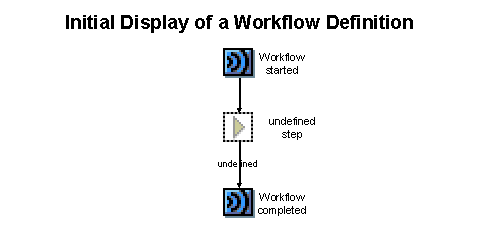

If no graphic is displayed or if the graphic displayed differs from that above, check the options in the Workflow Builder. Choose Extras ® Options and then on the View tab page the modeling view Graphic (network plan) and the view Without event controled process chains (NoEPCs).
·
The start of
the workflow definition is indicated by  Workflow started. If triggering
events are defined for the workflow displayed, these are represented by
the symbol
Workflow started. If triggering
events are defined for the workflow displayed, these are represented by
the symbol  and their description.
·
The end of
the workflow definition is indicated by Workflow completed.
· The area in which the new workflow definition can be added is indicated by an undefined step with an outcome. Steps are displayed in the form of symbols. The name of an outcome is shown in the standard view with an arrow.