 Processing Changed, Deleted, or Split Deliveries from ERP
If a delivery is changed, split, or deleted in SAP ERP, this information is sent to SAP Transportation Management (SAP TM). SAP TM adjusts the corresponding delivery-based transportation requirement based on this information.
The following sections describe how SAP TM handles these changes.
Process
Update of a Delivery
The following figure shows the process for updating a delivery in SAP ERP after delivery creation and is followed by a description.

In the above figure, the abbreviation TRSR means TransportationRequestSUITERequest.
The process runs as follows:
Update delivery (SAP ERP)
ERP sends a changed delivery to SAP TM.
Update delivery-based transportation requirement (SAP TM)
In SAP TM, the corresponding delivery-based transportation requirement is updated.
Adapt freight units (SAP TM)
The change controller adjusts the freight units according to the changes in the delivery-based transportation requirement.
If the quantity of the delivery-based transportation requirement has changed and the delivery-based transportation requirement is assigned to freight units that were consumed from an order-based transportation requirement, the change controller processes the freight units as follows:
If the quantity of the delivery-based transportation requirement has decreased, the open quantity of the corresponding order-based transportation requirements is increased accordingly; and the freight units of the delivery-based transportation requirement are split. Freight units are retained by the delivery-based transportation requirement to cover the reduced quantity of the delivery-based transportation requirement, and the remaining freight units are assigned to the corresponding order-based transportation requirement.
If the quantity of the delivery-based transportation requirement has increased, and there are still open quantities in the corresponding order-based transportation requirement, the system reassigns the freight units from the order-based transportation requirement to cover this increased delivery quantity. The system then reduces the open quantity of the order-based transportation requirements.
Determine and apply strategies (SAP TM)
Deletion of a Delivery
The following figure shows the process for deleting a delivery in SAP ERP after delivery creation and is followed by a description:
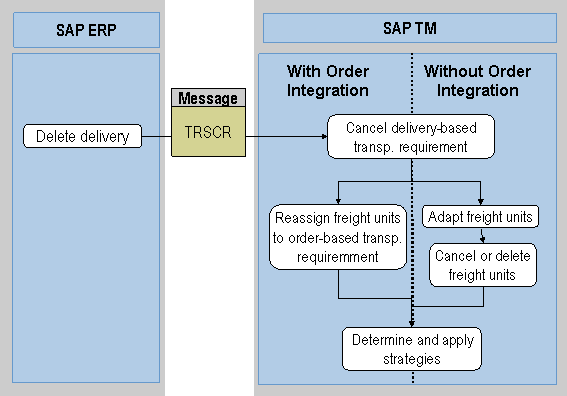
In the above figure, the abbreviation TRSCR means TransportationRequestSUITECancellationRequest.
The process runs as follows:
Delete delivery (SAP ERP)
ERP sends a request to cancel the delivery-based transportation requirement.
Cancel delivery-based transportation requirement (SAP TM)
In SAP TM, the corresponding delivery-based transportation requirement is canceled.
Reassign freight units to order-based transportation requirement (SAP TM)
If a corresponding order-based transportation requirement exists, the freight units are reassigned to this order-based transportation requirement.
 Note
NoteIf the process runs without order integration (that is, no order-based transportation requirement exists), the freight units are adapted and, if necessary, are canceled or deleted depending on your settings for the freight unit type.
End of the note.Determine and apply strategies (SAP TM)
Split of a Delivery
The following figure shows the process for splitting a delivery in SAP ERP and is followed by a description:
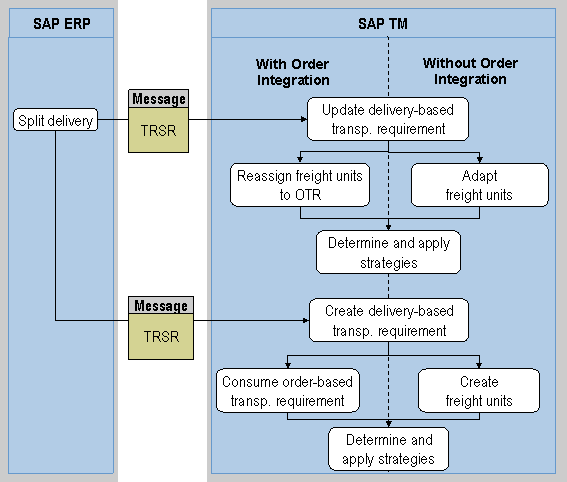
In the above figure, the abbreviation TRSR means TransportationRequestSUITERequest.
The process runs as follows:
Split delivery (SAP ERP)
Update delivery-based transportation requirement (SAP TM)
Reassign freight units to OTR / Adapt freight units (SAP TM)
The freight units are reassigned or adapted as described above in the section Update of a Delivery.
Determine and apply strategies (SAP TM)
Create delivery-based transportation requirement (SAP TM)
Consume order-based transportation requirement (SAP TM)
The freight units that were reassigned to the order-based transportation requirement are consumed by this new delivery-based transportation requirement.
NoteIf the process runs without order integration (that is, no order-based transportation requirement exists), SAP TM creates new freight units for the delivery-based transportation requirement if the delivery-based transportation requirement type is configured for automatic freight unit building.
End of the note.Determine and apply strategies (SAP TM)
Note that if a delivery split occurs after freight units have been planned in SAP TM, the SAP TM system reduces the quantity of the existing freight unit and creates a new freight unit that is assigned to a new, unplanned delivery-based transportation requirement. Planning then has to be carried out for both freight units.