
 Uploading Data for Vendor and/or Customer
Analysis
Uploading Data for Vendor and/or Customer
Analysis

Purpose
After you have completed the preparatory steps, you can start the data exchange with D&B. There are seven steps in the data exchange for vendor/ customer analysis.
Prerequisites
You have completed the preparatory steps, see Implementing D&B Marketing Universe for SAP BW.
Process
The following chart gives an overview of your tasks during the whole process. The following graphic refers to the D&B Vendor Analysis scenario but its content is also relevant for D&B Customer Analysis.
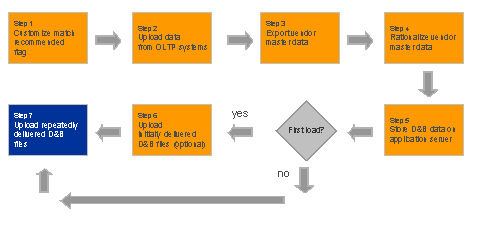
For a description of the individual steps, see:
· Customizing the Match Recommended Flag
· Uploading Data from OLTP Systems
· Exporting Vendor or Customer Master Data
· Rationalizing Vendor or Customer Master Data
· Storing D&B Data on an Application Server
· Uploading Initially Delivered D&B Files
· Uploading Repeatedly Delivered D&B Files