
 Data Exchange

The following graphics refer to the D&B Vendor Analysis scenario. In terms of meaning, however, they are transferable to the D&B Customer Analysis scenario.
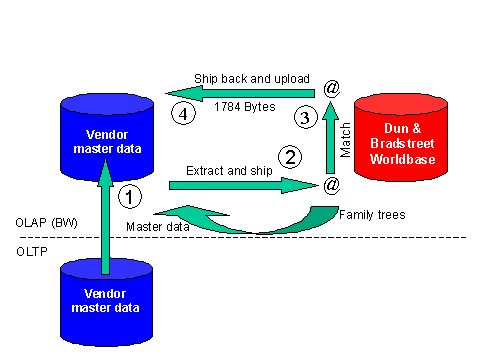
Initially, there is the vendor or customer master data provided from SAP R/3 and/or other OLTP systems (1). This data is uploaded into BW.
From BW, the vendor master data together with the invoice amount and effective purchase order value for each vendor is extracted to an export file. The purchase amount of each vendor is derived from the Purchasing InfoCube. The export file can then be sent to D&B (2). For the Customer Analysis scenario customer master data is extracted with the sales figures for each customer.
The next step in the process is the rationalization of the vendor or customer master data (3). D&B matches the data against their Worldbase database, so that every vendor or customer record is matched to a D-U-N-S number.
The resulting import file (vendor or customer number, D-U-N-S number and its attributes) is sent back to your company (4). The enhanced vendor or customer data is then uploaded into BW using the file interface. Various standard reports are available for analyzing your vendor or customer data. This enables you to locate for example duplicated or inactive vendors in your company database.
For the default Content scenario for 0Vendor, the InfoCube 0PUR_C01 and the query 0PUR_C01_DB_Q04 are used to extract to data to a file on the application server. This file has the same structure as the data dictionary structure RSDBEXPORTFILE. InfoCube 0SD_C03 and Query 0SD_C03_QDB001 are used for the Customer Analysis scenario.