
 SA Release with Pick-up Date or Delivery
Date
SA Release with Pick-up Date or Delivery
Date

Instead of the delivery date customer and vendor can send the pick-up date, which is the time at which a freight forwarder picks up the required materials or products from the vendor.
If the customer sends the pick-up date in the scheduling agreement (SA) release, the vendor can process the dates accordingly as well as confirm the quantities on the basis of the pick-up date.
In the procurement process, you can use the Date Key in the Release Creation Profile that you assign to procurement scheduling agreements to define which date you want to send to your customer in the release. (See also Release Creation Profile)
In the sales process the Date Key of the schedule line is displayed in the master data, in the release data or in the release and confirmation history of sales scheduling agreement releases and taken into account during shipment scheduling.
Prerequisites
In the procurement process you define whether you want to the send the pick-up date or the delivery date in the releases that you send to your vendors. You do this in Customizing for Supply Chain Planning under Collaborative Procurement ® Procurement Scheduling Agreement ® Maintain Release Creation Profile in the Date Key field.
For sales scheduling agreement items that you plan in the SAP APO system, you must also select ATP Check in the integration model, so that the material is scheduled in SAP APO. This ensures that when scheduling agreement releases are created in the SAP R/3 system over the CIF, the same dates (delivery date, goods issue date, loading date, material availability date, and so on) are determined as in the SAP APO system.
Features
Procurement
When the release is created – starting from the availability date (of the receipt in the product view) – the system determines the pick-up date or delivery date that is to be transmitted in the release:
-
The pick-up date is calculated
from the availability date minus the goods receipt processing
time (from the
 location-dependent
product master data) and the shipment duration of the means of transport
from the
transportation
lane.
location-dependent
product master data) and the shipment duration of the means of transport
from the
transportation
lane.
Pick-up Date = Availability Date – Goods Receipt Processing Time – Move Time
- The delivery date is calculated from the availability date minus the goods receipt processing time.
Delivery Date = Availability Date – Goods Receipt Processing Time
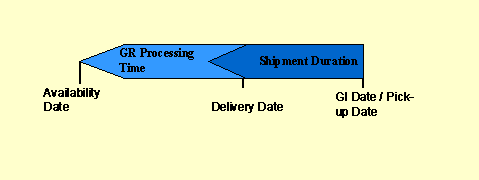
On the procurement side, it is always the delivery date that is sent to the linked SAP R/3 system and displayed in the scheduling agreement, independently of whether you send the pick-up date or the delivery date to your vendor.
Sales
On the sales side, the material availability date is determined on the basis of the pick-up or delivery date.
● Starting from the desired delivery date backward scheduling takes place in order to determine the material availability date.
Material Availability Date = Delivery Date – Shipment Duration – Loading Time – Pick/Pack Time
● Starting from the pick-up date (GI date) backward scheduling takes place in order to determine the material availability date.
Material Availability Date = GI Date – Loading Time – Pick/Pack Time
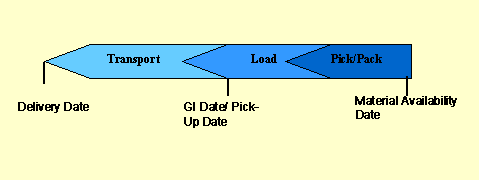
The material availability date is determined on the basis of the conditions that you have defined in the master data for transportation and shipment scheduling.
You can simulate
shipment scheduling in master data maintenance for the sales scheduling
agreement ( Shipment
Scheduling tab page).
Shipment
Scheduling tab page).
For more information see
Transportation
and Shipment Scheduling under Global Availability Check (Global ATP).
If the operative and forecast/planning delivery schedules contain different date keys then the date key of the most recent delivery schedule is used during the generation of the due delivery schedule.
In the sales scheduling agreement in the linked SAP R/3 system the calculated dates are displayed in the scheduling agreement on the Shipping tab page. If your customer sends the pick-up date then the delivery date and the goods issue date are identical.
See also:
For more information see the SAP Library under SAP Advanced Planner and Optimizer (SAP APO) ® Production Planning and Detailed Scheduling (PP/DS) ® External Procurement ® Collaborative Management of Delivery Schedules.