
 Release Management for Sales Scheduling
Agreements (SCM-APO-PPS-CDS)
Release Management for Sales Scheduling
Agreements (SCM-APO-PPS-CDS)

Use
The business advantage of managing scheduling agreement (SA) releases against sales scheduling agreements is that it takes both customer requirements and the development of your own stocking situation for a product into account at the same time. Therefore, the target groups are a vendor’s planners, who work at the interface between sales order processing and Supply Chain Collaboration.
The goal of release management against sales scheduling agreements is to significantly improve the quality and efficiency of release processing on the one hand, and to achieve greater stability in internal Supply Chain Collaboration and improved communication with customers on the other.
Prerequisites
You have made the necessary settings for the SAP R/3 system and the SAP APO system, transferred the necessary data and if necessary, maintained data and re-assigned profiles.
See also Prerequisites for the Sales Scheduling Agreement
Constraints/Integration
Collaborative management of SA releases was developed with the requirements of the automobile industry in mind, but can also be used in other industries. Only certain categories of sales scheduling agreement are supported. (See APO Sales Scheduling Agreement)
In SAP APO Release 3.1, collaborative management of SA releases can only be used in conjunction with an R/3 system with Release level DI 4.6C2 and CRT4.
As of release SAP APO 4.0, you can also use collaborative management of delivery schedules in connection with SAP R/3 Enterprise Core 4.70 with Plug-In PI2002.1.
As of SAP BI Content 3.3 Add-On, you can evaluate data relating to sales scheduling agreement items that comes from SAP APO in the SAP Business Information Warehouse (SAP BW).
For more
information, see the SAP Help Portal at help.sap.com ® SAP NetWeaver ® SAP Business Information
Warehouse ® SAP BW 3.1/BI Content 3.3 Add-On
® Business Information Warehouse
® BI Content ® Supply Chain Management ® Supply Chain Performance Management
®  Sales Scheduling Agreement Processing.
Features
The planner can generate a worklist in the product view and product planning table of the SAP APO system and successively process the items on the list.
All requirements (from sales orders or scheduling agreement releases for example) and receipts for a product are displayed in the product view.
In the product planning table, the planner can select only the requirements/schedule lines for the next three weeks, for example, using the planning horizon.
The planner can manually schedule production orders, correct the confirmations relating to the SA releases, and re-trigger the admissibility check, feasibility check, and planning heuristics for individual releases. When the planner concludes manual processing the planning result in the dialog becomes MRP relevant and if necessary the confirmation is sent to the customer.
Release management reduces the planner’s workload because the system automatically carries out routine activities so that the planner only has to react when exceptional situations arise.
The following diagram illustrates the process of collaborative management of delivery schedules with confirmations from the vendor’s perspective:
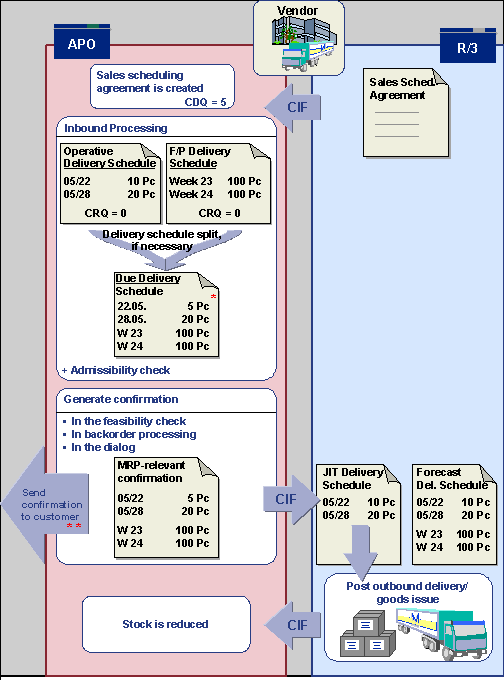
* The due delivery schedule contains an open quantity
of 5PC.
Open
quantity = original quantity (10) – quantity in transit (5)
Quantity
in transit = cumulative delivered quantity (5) – cumulative received
quantity (0)
** With the earliest schedule line the customer receives confirmation of the open quantity of 5 pc and the in-transit quantity of 5 pc and is informed of the CDQ of 5 pc.
Activities
Display, Maintain, and Delete Sales Scheduling Agreement
In the SAP APO System, choose Master Data ® Master Data for Sales Scheduling Agreement Processing ® Maintain or Delete Sales Scheduling Agreements.
The Current Status
field on the  Delivery Schedule tab page shows you the status of the scheduling
agreement, based on the admissibility and feasibility checks, and whether it
has already been fully confirmed or confirmed with differences.
Delivery Schedule tab page shows you the status of the scheduling
agreement, based on the admissibility and feasibility checks, and whether it
has already been fully confirmed or confirmed with differences.
Fiscal Year Change
In the SAP APO system, choose Master Data ® Master Data for Sales Scheduling Agreement Processing ® Manage Fiscal Year.
Checking, Planning, and Alerts
In SAP APO choose:
· Supply Chain Collaboration ® Sales Scheduling Agreement Processing ® Product Planning Table (Sales Scheduling Agreement)
· Production Planning ® Interactive Production Planning ® Product View
· Supply Chain Monitoring ® Alert Monitor
· Production Planning ® Automated Production Planning and Optimization ® Production Planning Run
· Production Planning ® Automated Production Planning and Optimization ® Production Planning Run in the Background
· Production Planning ® Reporting ® Logs ® Log for the Last Planning Run
Confirmations and Releases
· Supply Chain Collaboration ® Sales Scheduling Agreement ® Display Scheduling Agreement Releases and Confirmations
· Supply Chain Collaboration ® Sales Scheduling Agreement ® Delete Scheduling Agreement Releases and Confirmations
· Supply Chain Collaboration ® Sales Scheduling Agreement ® Output of Confirmations
Backorder Processing
· Global ATP ® Backorder Processing ® Interactive Backorder Processing
· Global ATP ® Backorder Processing ® Backorder Processing in the Background
Mass Changes
· Master Data ® Mass Maintenance
Current Settings
· IDoc Inbound Processing
Supply Chain Collaboration ® Sales Scheduling Agreement Processing ® Current Settings ® IDoc Inbound Processing ® Define Inbound Release Processing or Define Determination of the Sold-To Party
· Default Profile for Initial Data Transfer
Supply Chain Collaboration ® Sales Scheduling Agreement Processing ® Current Settings ® Default Profiles for Initial Data Transfer ® Maintain Default Control Profile or Maintain Default Confirmation Profile