 Days Sales Outstanding - Calculation for All Periods
This document explains how the system calculates the Days Sales Outstanding (DSO) figures for all periods within a 12-month period ending today. This calculation is used in the Days Sales Outstanding KPI: on the KPI tile, in the drill-down by company, and in the drill-down by customer.
Prerequisites
In the KPI Modeler, you need to specify the periods for which you want to calculate the DSO figures (for example for 1, 3, or 12 months). For this purpose, there are two input parameters that you need to set:
P_RblsRollingAverageMonths for receivables (referred to as P1 in this document)
P_RevnRollingAverageMonths for sales (referred to as P2 in this document)
These input parameters can have the same value or different values. When setting the P1 value, you need to consider that there could be values in open receivables that remain open for a long time before they are paid. When setting the P2 value, you need to consider whether sales take place sporadically or seasonally. As a rough guideline, if sales and payments are homogenous and frequent, the two parameters could be small and have the same value. The smaller P1 is, the more the DSO figures fluctuate. When payments are made, the DSO figures go down steeply; if payments are not made, the DSO figures go up steeply.
To calculate the DSO figures, the system takes into account open receivables (items that have been invoiced but not yet paid or cleared) and sales (items that have been invoiced, and may or may not have been paid). Partial payments are not taken into account. Items must be cleared completely.
Example
Example 1: This example shows the DSO calculation for all periods in a 12-month period where 3 months are taken into account for each period. In this example, P1 = 3, and P2 = 3.
Let's say the 12-month period ends in December. The system calculates the DSO figures for a 12-month period ending today (in December) as follows:
Adds the open receivables for the first month in the 12-month period, for the number of months specified by P1 (3) ending on that month.
In this example, this would be the total open receivables for November, December, January.
Repeats Step 1 for each month until the end of the 12-month period.
In this example, this would be for February, March, .... until December.
Adds all 12 results for open receivables
Divides this sum by P1 (3).
Multiplies this total by 30.
Adds the sales for the first month in the 12-month period, for the number of months specified by P2 ( 3) ending on that month.
In this example, this would be the total sales for November, December, January.
Repeats Step 6 for each month until the end of the 12-month period.
In this example, this would be for February, March, .... until December.
Adds all 12 results for sales.
Divides this sum by P2.
Divides the result from Step 5 with the result from Step 9.
The results then look like this:
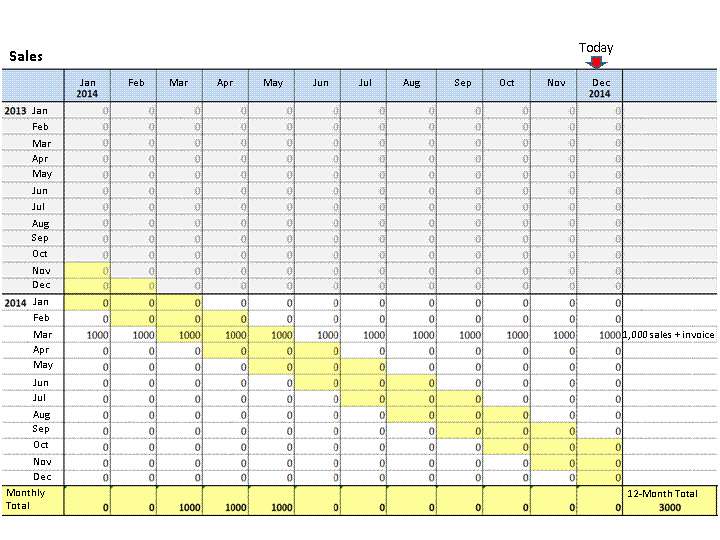
Total Sales for the Last 12 Months (3-Monthly Periods)
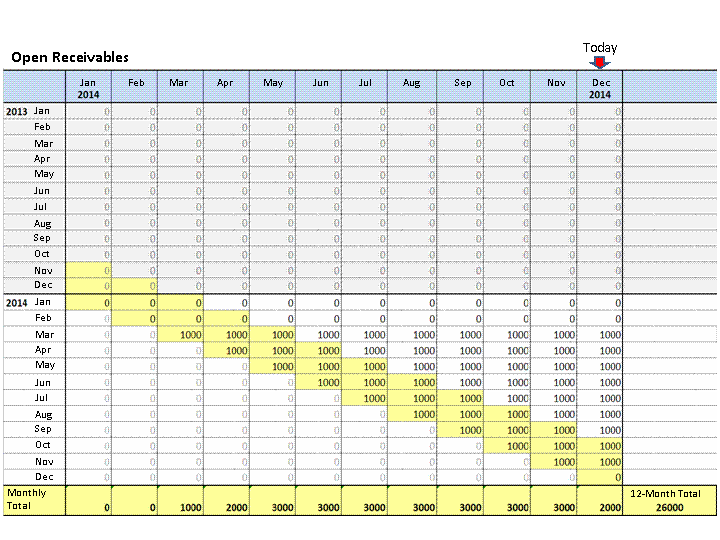
Total Open Receivables for the Last 12 Months (3-Monthly Periods)
The DSO figure for all 12 periods ending in December 2014 is ((26,000 / 3) x 30) divided by 3,000 / 3 = 260.
Example
Example 2: This example shows the DSO calculation for all periods in a 12-month period where 12 months are taken into account for each period. In this example, P1 = 12, and P2 = 12.
Let's say the 12-month period ends in December. The system calculates the DSO figures for a 12-month period ending today (in December) as follows:
Adds the open receivables for the first month in the 12-month period, for the number of months specified by P1 (12) ending on that month.
In this example, this would be the total open receivables for February 2013 to January 2014.
Repeats Step 1 for each month until the end of the 12-month period.
In this example, this would be for February, March, .... until December.
Adds all 12 results for open receivables
Divides this sum by P1 (12).
Multiplies this total by 30.
Adds the sales for the first month in the 12-month period, for the number of months specified by P2 ( 12) ending on that month.
In this example, this would be the total sales for February 2013 to January 2014.
Repeats Step 6 for each month until the end of the 12-month period.
In this example, this would be for February, March, .... until December.
Adds all 12 results for sales.
Divides this sum by P2.
Divides the result from Step 6 with the result from Step 9.
The results then look like this:
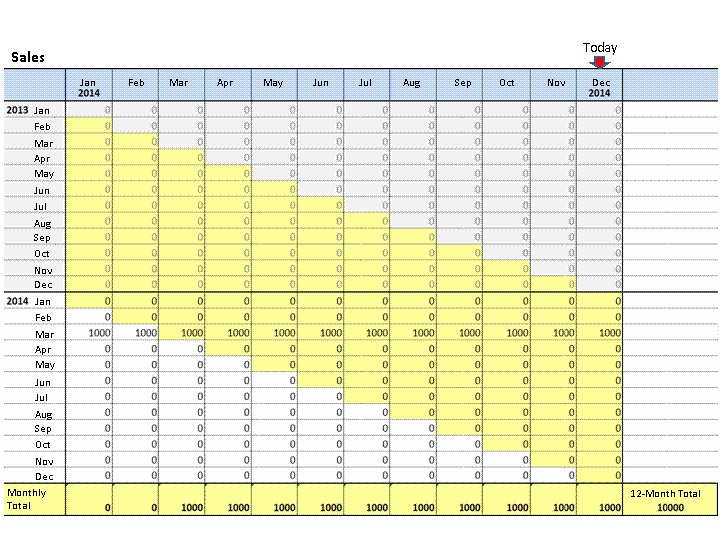
Total Sales for the Last 12 Months (12-Monthly Periods)
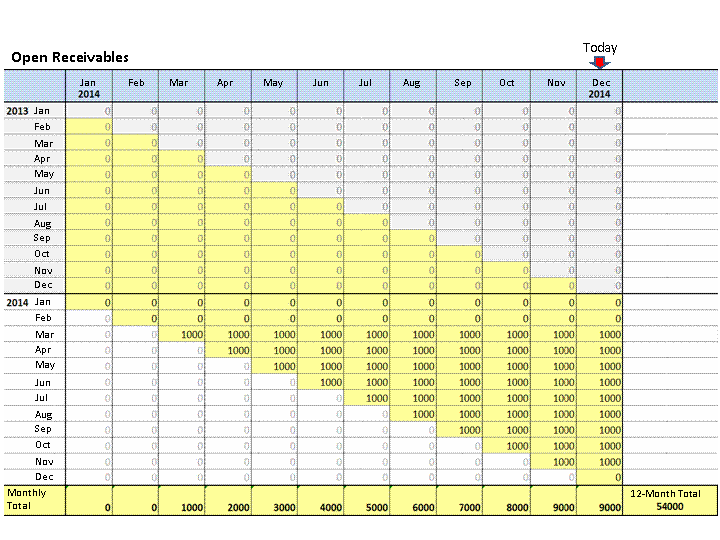
Total Open Receivables for the Last 12 Months (12-Monthly Periods)
The DSO figure for all 12 periods ending in December 2014 is ((54,000 / 12) x 30) divided by 10,000 / 12 = 162.
More Information
For information on the Days Sales Outstanding app, see Days Sales Outstanding.