 Supplier Preselection in Supplier Self-Services
To use this function, you must activate the business function SRM, Supplier Collaboration (SRM_SUCO_1).
With the enhanced supplier preselection functions, you use the potential suppliers overview in supplier self-services to accept or reject suppliers. From this overview, you can also transfer accepted potential suppliers to SAP ERP automatically.
The following Customizing activity is relevant:  SAP Supplier Relationship Management
  Supplier Collaboration Supplier Self-Registration Activate/Deactivate Supplier Self-Registration
 .
.
In supplier preselection you can select from those suppliers that have entered their data in Supplier Registration. By accepting suppliers, you decide the following:
Which suppliers are to be visible to the purchaser in SAP Supplier Relationship Management (SAP SRM) using the OPI link. This applies if you use supplier registration with SAP SRM.
Which suppliers can be transferred to the SAP ERP back-end system. This applies if you use supplier registration with SAP ERP and without SAP SRM.
Supplier Preselection with SRM Server
The suppliers that you have accepted in supplier preselection appear in the Supplier Directory. From the supplier directory, the purchaser can transfer suppliers as operational suppliers into SAP SRM using an Open Partner Interface (OPI). For example, you can access accepted potential suppliers while creating suppliers. You do this using the Add External Supplier From button.
 Note
Note
A supplier's data only becomes available for business partner management after you have transferred the supplier from the supplier directory into the SAP SRM system. You do this using the Add External Supplier Frombutton.
Supplier Preselection with SAP ERP
You can transfer accepted potential suppliers automatically to SAP ERP. You do this using the Transfer button in the potential suppliers overview in supplier self-services.
 Caution
If you specify more than one back-end system, you can only transfer suppliers from the supplier details, not from the POWL displaying the potential supplier overview.
Prerequisites
Supplier Preselection with SRM Server
You have been assigned at least one of the following roles:
Purchasing Assistant
Professional Purchaser
Operational Purchaser
Strategic Purchaser
The Preselect Suppliers transaction is delivered with single roles. To use the transaction, you must enter the URL for supplier preselection in the single role. Then you must update and activate the composite role.
Supplier Preselection with SAP ERP
You have logged on to supplier self-services with the role /SAPSRM/SUCO_PROCESSOR.
Features
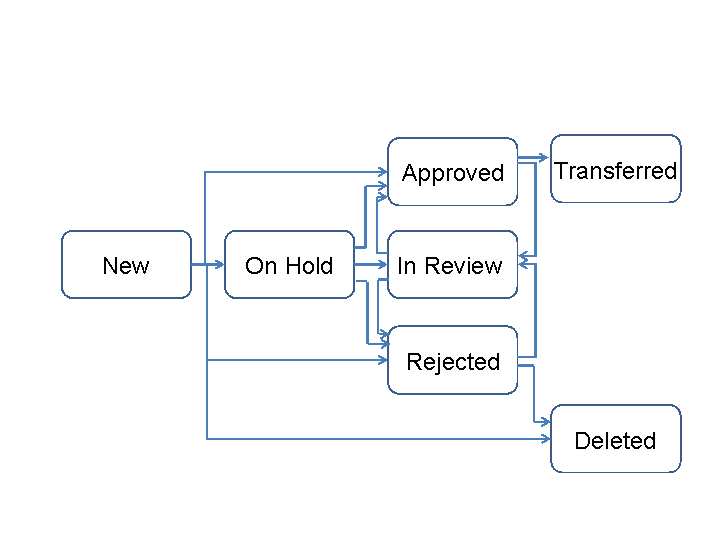
The statuses that are available for potential suppliers in supplier self-services are displayed in the following graphic:
Activities
Supplier Preselection with SAP SRM
In the Strategic Purchasing work center, select Business Partner Preselect Suppliers .
To display details for a supplier, click the supplier name.
Supplier Preselection with SAP ERP
Select the Supplier Preselection work center in supplier self-services.