 SRM-MDM Catalog: Service Procurement
You use the SRM-MDM Catalog to search and procure services from suppliers.
It provides:
Uploads of service hierarchies from the SAP Supplier Relationship Management (SAP SRM) RFx
Uploads of service hierarchies from SAP ERP using the transaction MECCM
Upload of service hierarchies and contract details from SAP SRM central contracts
Service procurement catalogs
Web-enabled catalog search
Fully configurable search user interface (UI)
Cart Preview. For more information, see User-Specific Configuration: Shopping Options.
The SRM-MDM Catalog is based on functions provided by SAP NetWeaver Master Data Management (SAP NetWeaver MDM) and bundles together in one specific application those SAP NetWeaver MDM functions required for the service procurement scenario.
The figure below displays an overview of the upload scenario for service procurement and the service procurement scenario for the SRM-MDM Catalog.
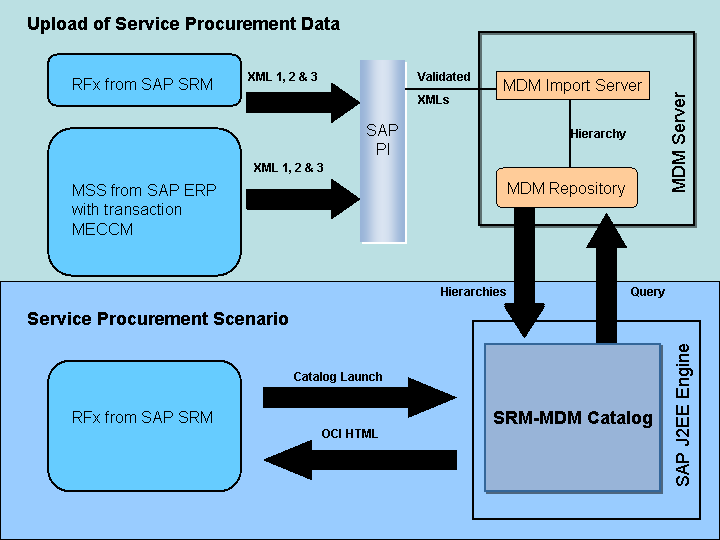
Service Procurement
Legend
XML 1 = Hierarchy structure (headers and outlines)
XML 2 = Service Items (functional location, infolines and free text)
XML 3= Non-hierarchical items (not applicable for service data transferred from SAP ERP)
Integration
The following table shows the SAP NetWeaver MDM components included in the SRM-MDM Catalog for service procurement:
MDM Server |
MDM Import Manager |
MDM Import Server |
MDM Business Content |
MDM Console |
MDM Java API |
MDM Data Manager |
Business Scenarios
The search in the catalog repository is integrated with the following SAP SRM and SAP ERP business scenarios:
SAP SRM: Self-Service Procurement
SAP SRM: Service Procurement
SAP SRM: Contract Management
Features
Import of service hierarchies using the MDM Import Manager with SAP Process Integration (SAP PI)
The MDM Import Manager with SAP Process Integration (SAP PI) is used for importing service hierarchies based on the SAP SRM RFx. XML is supported.
For more information, see Transferring Service Hierarchies from SAP SRM.
Import of service hierarchies from SAP ERP
The transaction MECCM is used for importing service hierarchies from SAP ERP. XML is supported.
Provision of data for a web-enabled catalog search
Using the MDM Data Manager, you can determine the necessary parameters for collecting the data for your procurement catalog and making them accessible on the Web. From the procurement application of the supported business scenarios you can open the SRM-MDM Catalog, select catalog items, and transfer the data.
Predefined catalog repository
The SRM-MDM Catalog includes a predefined data repository for your catalog data. This standard repository comprises the main table Catalog Items and a number of additional sub-tables, for example, for value lookups or classification.
For more information, see Loading Predefined Repositories for Service Procurement.
Fully configurable user-specific search UI
All aspects of the Search UI are configurable to meet user-specific requirements. For more information, see User-Specific Configuration for Service Procurement.
Inheritance Levels for Supported Languages
The system enables inheritance levels for the supported languages.
 Example
US is to be used as the primary language. FR as the secondary language in case US is unavailable. DE substitutes the secondary language if FR is unavailable.
On the other hand, the language of your content (the data language in fields and tables, for example) can be in any language supported by SAP NetWeaver MDM 7.1.
The following table shows the supported languages:
Chinese (ZH) |
Finnish (FI) |
Hungarian (HU) |
Polish (PL) |
Swedish (SV) |
Czech (CS) |
French (FR) |
Italian (IT) |
Portuguese (PT) |
Thai (TH) |
Danish (DA) |
German (DE) |
Japanese (JA) |
Russian (RU) |
Turkish (TR) |
Dutch (NL) |
Greek (EL) |
Korean (KO) |
Slovakian (SK) |
|
English (US) |
Hebrew (HE) |
Norwegian (NO) |
Spanish (ES) |
Constraints
The SRM-MDM Catalog component for service procurement uses SAP NetWeaver MDM technology. However, it does not cover the full scope of functions provided by SAP NetWeaver MDM.
 Note
Note
Service procurement data can only be uploaded from SAP SRM or SAP ERP.
For more information, see:
Transferring Service Hierarchies from SAP SRM
Transferring Service Hierarchies from SAP ERP
SAP Note 1250442