 Processing Collaborative Bidding Events Using cFolders
You can use this business process to create RFx and to integrate them in a document storage functionality that is managed in cFolders. This document storage functionality supports RFx for complex technical products requiring specifications and plans.
As a purchaser, you create an area in cFolders, which is accessible to all your bidders. In this area, you store your documents and specifications.
When bidders submit RFx responses, a separate area of cFolders is created, which is accessible only to you and to the respective bidder. In these areas, bidders store the plans and documents that they have produced in response to the RFx.
Process
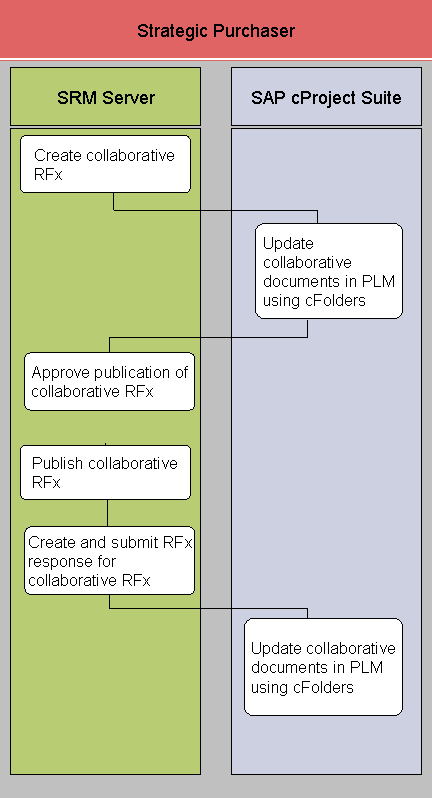
Create collaborative RFx (SRM Server)
This process step is modified if you have activated the SRM, Strategic Sourcing Innovations (SRM_SOURCING_1) business function. If you have activated this business function, the bidder can bid offline and modify the RFx response they submit.
Update collaborative documents in SAP Product Lifecycle Management (SAP PLM) using cFolders (SAP cProject Suite)
Approve publication of collaborative RFx (SRM Server)
Publish collaborative RFx (SRM Server)
Create and submit RFx response for collaborative RFx (SRM Server)
This process step is modified if you have activated the SRM, Strategic Sourcing Innovations (SRM_SOURCING_1) business function. If you have activated this business function, the bidder can bid offline and modify the RFx response at line item level.
Update collaborative documents in SAP PLM using cFolders (SAP cProject Suite)