 Evaluating Bids or RFx Responses
You use this business process to evaluate bids received in response to an auction, or RFx responses received in response to an RFx, and to decide and award the winning bid or RFx response.
You can integrate the award of a winning bid or RFx response in an approval workflow.
Process
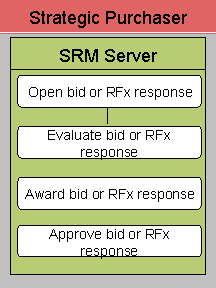
The following business process runs in the SRM Server system:
Open Bid or RFx Response
Open the bid or RFx document and choose Responses and Awards to display all bids or RFx responses from all bidders. Select the bid or RFx response and open the bid or RFx response document to view the complete details.
Evaluate Bid or RFx Response
You can open the responses from all bidders in the Bid Comparison view. In this view, the purchaser can compare the responses of all bidders. For each item, the submitted quantity, price, alternative and supplementary items added by the bidder, and the answers submitted in response to the qualification questionnaire are available.
Award Bid or RFx Response
You can award bids or RFx responses in the Responses and Awards or the RFx Response Comparison views. You can accept some or all of the items from a bidder. You can also accept responses from multiple bidders.
Approve Bid or RFx Response
After accepting the RFx response documents, they are sent to the responsible purchasing manager for approval. A work item appears in the approving manager’s inbox.