Defining Device Group Priority
Context
You can change the order of the device groups, to determine the order in which the device groups are evaluated at runtime. The first device group that matches the user agent of the portal access device is used.
Any settings in the Device Group Manager will only take effect at runtime if the device group mechanism has been activated. For more information, see Activating the Device Group Mechanism .
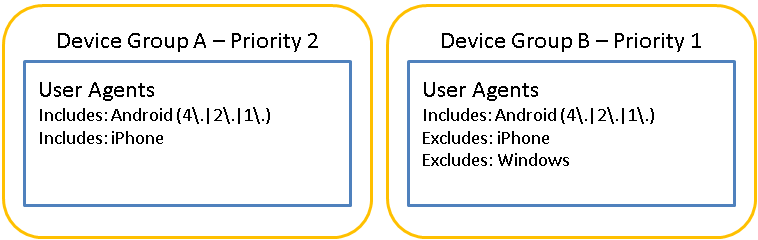
For example, in the device groups below, if a user accessed the portal from a browser with the following user agent Mozilla/5.0 (Linux; U; Android 2.1-update1; en-us; ADR6300 Build/ERE27) AppleWebKit/530.17 (KHTML, like Gecko) Version/4.0 Mobile Safari/530.17 , then they would be assigned to Device Group B. The user agent actually matches both device groups, but the one with the higher priority is evaluated first and assigned.
Procedure
- In the portal, navigate to
 System Administration
  System Configuration Portal Display Device Group Manager
  .
.