Changing Linked Objects in Roles and Worksets
You can modify all content objects that have been added to roles and worksets. The procedure is the same for both delta links and copies.
You can make the following changes:
-
Changes to the Source Object
You can, for example, add an iView to a role and then change it by accessing its source iView through the linked object in the role. The change you make is not performed locally in the role; it affects only the source object of the iView.
The change has the following effect:
-
The linked iView within the role takes on the changes to the source iView.
-
All objects derived from the source iView take on the changes made to it.
Changing a source object always results in the change being copied to all objects derived from the source object. For more information, see How Are Portal Objects Linked? and How Are Object Properties Inherited?
You can access source objects using the delta link tracer. This tool displays the position of an object within a delta link chain; it shows the source object and its dependent objects. You can locate each object in the delta link chain in the Portal Catalog, and load an object from there into the corresponding object editor for modification. For more information, see Tracing Delta Link Dependencies .
NoteYou must have the required permissions to display or change a source object.
-
-
Local Changes
You can add an iView or page to a role and then change the object within the role. This kind of change affects only the iView or page in the role. The change has no effect on other objects. In this case, only the linked object in the role is changed; the source object remains unchanged.
If you make local changes to an object that is a delta link, these changes are noted in the Role or Workset editor, with the addition of the text added or changed in parentheses, next to the modified object.
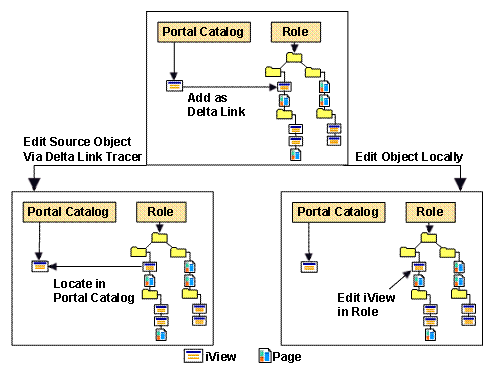
The following graphic shows how you can change a linked iView within a role:
-
By changing the source object with the delta link origin
-
With local changes in the role
Changing a Source Object of a Role, Workset, Page, or iView
-
Select the root node and choose Delta Link Tracer . The delta link tracer opens.
-
Select the Show Delta Link Sources option, if not already selected.
-
In the context menu of the source object, choose Locate in Portal Catalog .
-
Edit the source object in its object editor.
Changing a Role, Workset, Page, or iView Locally
-
Select the object.
-
Choose Edit . The object editor opens.
-
Edit the object as needed. The changes will apply only to the local object.