Creating OTR Alias Texts
You have integrated the terms you want to create as alias texts in accordance with the OTR Directives) into your BSP layout.
You can create OTR alias texts in the following ways:
-
By double-clicking on the OTR alias in the page editor
-
By choosing the menu option
 Goto
Goto  OTR
OTR  from the BSP application
 -
Using transaction SOTR_EDIT
Creating OTR alias text by double-clicking from the BSP application
-
In your BSP application double-click on an OTR alias text that is not yet available.
-
Confirm the prompt asking you if the text should be created.
The screen below appears:
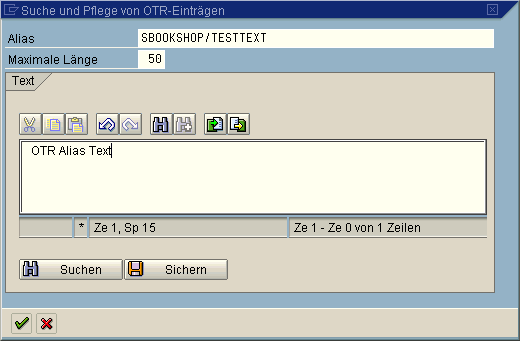
If you have not yet specified a packet name for the OTR alias in your BSP, the system automatically extends the prefix in the page as well as in the OTR.
-
Enter the required text up to a maximum length of 255 characters.
-
Enter the length of the text in the Maximum Length field.
Always consider translation needs by entering a longer length than the text itself. If you do not enter a value in this field, the system stores the OTR alias in its current length.
-
To save the text choose Save.
If you want to use an existing text from the Basis vocabulary, you can also branch using Search to the Online Text Repository Browser where you can find and select a suitable text for your BSP.
-
If the OTR text contains abbreviations or anything else that make translation difficult, once you have pressed the Release button, the system sends a further popup where you can enter explanations or comments.
Enter a comment and choose
 .
.
Creating OTR alias text using the BSP application menu
-
In your BSP choose
Goto Online Text Repository Browser .On the following screen first of all the texts of the packet you are currently editing are displayed. The package SOTR_VOCABULARY_BASIC contains standard texts for you to use. You can use these texts across all applications. All other texts on the other hand should always be assigned to one packet only.
-
Select a text from the existing texts, choose
 , to change an existing text, or choose
 to create a new text in your packet.
 -
Continue as described in the section above.
Creating OTR alias text using transaction SOTR_EDIT
-
Call transaction SOTR_EDIT.
You branch to the OTR initial screen. Your logon language is set at the language by default.
-
If required, change the language in which the text is to be created.
-
Then enter the alias name in the Alias field.
-
Choose Create.
-
On the next screen enter the package name, the alias name, the object type (for BSP applications this is always WAPP) and the alias text and then choose Save.
After saving you will find in the Concept field a unique GUID under which you will find your text in the OTR.
Notes on the Transport
An OTR text not assigned to a local or private packet is included in a transportable change request when the text is created. This ensures that new or changed texts are also transported into the subsequent systems. The connection to the Change & Transport System is thus guaranteed.
See also: