Field History
In Internet Explorer 5, the history data for a specific history ID is encrypted and stored at the client side. However, the user can also deactivate this function in the browser settings. Recording data to the history is initiated by using a submit button on the page (a Submit in JavaScript is not sufficient)
History ID
Using service methods GET_HISTORY_ID andGET_LOCAL_HISTORY_ID it is possible to define two types of valid history ID:
A global history ID: sap.<historytxt>
A local history ID: sap.<application>.<historytxt>
In contrast to a global history ID,a local history ID is application-specific and therefore ensures that the field history is adapted to the current application.
The history ID is transferred to an HTML input field by setting the VCARD_NAME attribute. If no VCARD_NAME attribute is specified, the NAME attribute is used for determining the history. You can deactivate the attribute by setting AUTOCOMPLETE=off.
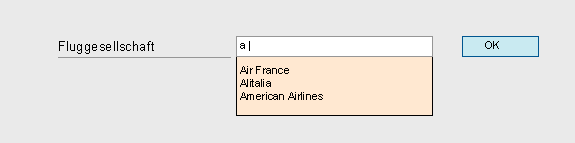
Field: SFLIGHT-CARRID with Field Label and History:
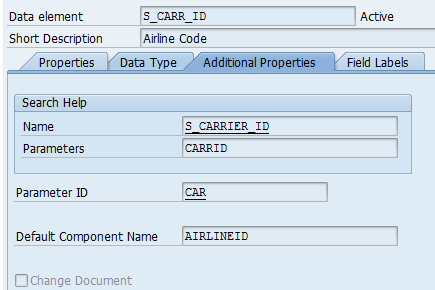
Definition of Data Element forSFLIGHT-CARRID:
Global history ID Sap.car or local history ID Sap.<application>.car can be ascertained from parameter ID car.