Application Design
This section provides an overview of the architecture and technologies used for the creation of the Project Management and Employee Services application, as well as the design and implementation of the application itself. You can use the hints when creating your own Java EE 5 applications with SAP NetWeaver Composition Environment.
Application Layers
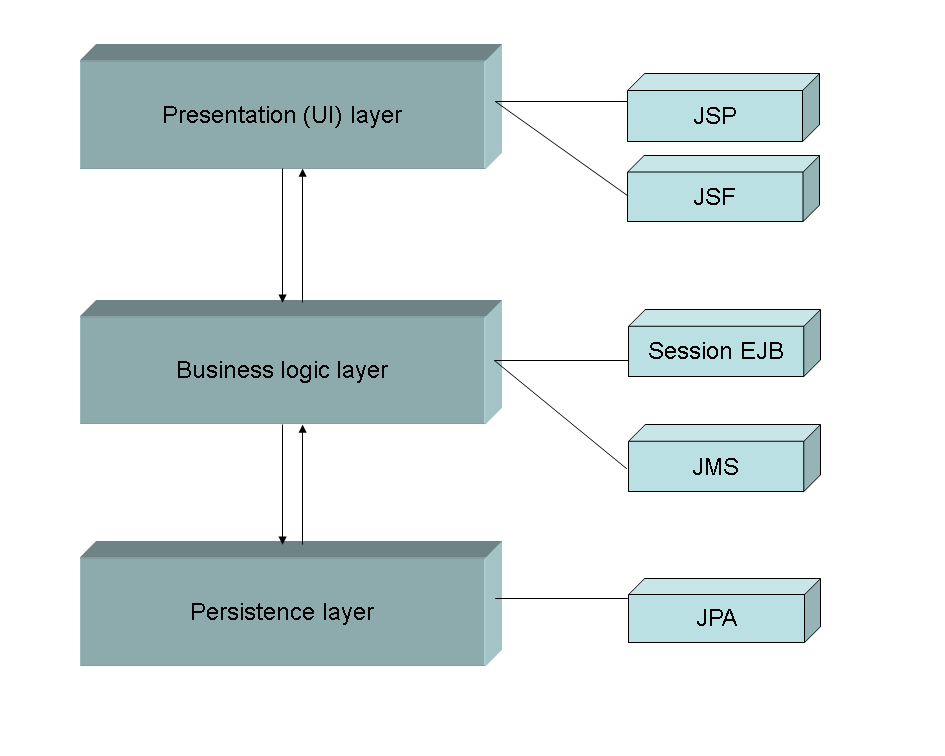
As a business application based on Java EE 5 technology, the Project Management and Employee Services application consists of the following application layers:
Persistence Layer
This layer implements the data model of the application. The data model components are implemented as persistent entities using Enterprise JavaBeans (EJB) 3.0 technology. The Java Persistence API makes the application independent from the specific vendor's mapping requirements. The developer can either use annotations or XML descriptors to specify object-relational mapping information.
For more information about the data model of the Project Management and Employee Services application, see Application Data Model .
Entities are POJOs (Plain Old Java Objects) annotated with metadata. They can be serialized and distributed across the network even in a persistence-unaware environment.
Below, you can find general guidance for using the SAP NetWeaver Composition Environment to implement a persistence layer of Java EE 5 applications:
-
The business model is implemented using entities and you can rely on the direct usage of entities to transport values and objects.
-
Instead of using object-relational mapping descriptors, declaration and configuration of persistent entities can be defined directly within the Java code, using annotations.
-
Do not exaggerate the connections of entities by defined relationships.
-
Decide carefully when to use lazy loading (specification does not require that the server provides it).
Lazy loading can improve the application performance dramatically, but detached entities cannot be loaded lazily. Detaching means that an entity can be passed to a separate application layer (for example, from the business logic to the presentation layer). However, an entity that is outside the persistence context does not have valid references to entity sets (collections, single entities) of lazy relations. To get lazy related entities or collections of a relation tree you have to go back and request the entity that owns the relation and fetch the related entities again in the context of the persistence unit. This feature can influence your application design and has to be considered in an early stage of the design and development.
-
To improve performance, loosely-connected entities with relationships that are not expected to be used so regularly can be loaded by queries.
Business Logic Layer
The business logic layer of the Project Management and Employee Services application is implemented via session beans, which are part of the Enterprise JavaBeans 3.0 technology.
This layer performs the session operation between the components of the application, and implements the actual entity management. Generally, the business logic layer manages the persistent entities - finding objects (employees, projects, skills) by different attributes, creating and updating object instances, and so on.
When resetting the application data, the session bean that implements project management capabilities sends a JMS message to a configured JMS destination (a JMS queue). Message-driven beans enable the asynchronous consumption of JMS messages. A concurrent consumption of messages is possible with the EJB container architecture. The typical message driven bean comprises two parts:
-
A "sender" part that sends the message to the queue (the session bean calls this part of the bean)
-
A "receiver" part that processes the received messages in the queue (the EJB container calls this part automatically upon a message receipt in the queue).
Below, you can find some general recommendations regarding the business logic layer implementation:
-
Create only the interfaces that are really necessary. In most cases, local interfaces fulfil the requirements, and they are the recommended approach if all parts of your application run in the same Java Virtual Machine (JVM).
-
Use dependency injection instead of the Java Naming and Directory Interface (JNDI) to access and call enterprise beans. Dependency injection negates the complexity around the JNDI API from the bean developer's and client's viewpoint.
Presentation Layer
The presentation layer has the required elements for visualizing the controller logic presented in the application business layer. The Project Management and Employee Services application utilizes the JavaServer Pages (JSP) 2.1 and the SAP component library for JavaServer Faces (JSF) 1.2 technologies, as well as automatic Create-Read-Update-Delete (CRUD) facade generation, provided by the SAP NetWeaver Developer Studio.
Unlike pure servlets and JSP technologies that mix the HTML presentation (VIEW) logic with the programming MODEL and CONTROLLER logic in the application, user interface (UI) designers work with XML-like tags and programmers write the business logic using Java beans. Then designers use these beans properties for the application UI.
Below, you can find some general recommendations related to implementation of the presentation layer:
-
Create beans to wrap EJBs (used as JSF-managed beans to combine the dual layers of Web actions and EJBs).
-
We do not recommend that you mix frames technology in JSF pages as it is difficult to handle JSF navigation.
-
Use backing beans and attributes defined therein in the smallest scope that fits the requirement.
-
Avoid using properties of global (session or application) scope at different pages, especially for different meanings.
-
Clear separation of concerns to reduce possible side effects.
-
Standardize similar UIs and use fitting beans that can be configured in the faces-config.xml to serve in each of the cases.
-
Cached entities (or lists of them) in higher layers may worsen the memory consumption and performance.
-
Avoid huge lists and objects to be cached.
-
Think about maintaining the most recent state of cached entities.
-
Restrict access to Create, Read, Update, Delete (CRUD) operations for these entities to a small, well-maintained API. When caching, strive for a consistent manner to avoid side effects or locking exceptions.
-
Usage of multiple forms on one page could lead to inconsistency.
-
Only use multiple forms on one page if both forms are distinct semantically and lead to independent navigation paths.
-
Consider where to store JSF View state information.
The specification and implementation provide client-side saving and server-side saving.
In case of views with a huge number of UI components, server-side state saving should be considered. In this way, the communication traffic is reduced as the view state is not propagated back to the client. For more information, see JSF 1.2 Specification section 7.6.2 State Saving Alternatives and Implications.