Creating an Adaptive RFC2 Sample Application without using Web Dynpro
Prerequisites
-
You have the knowledge of Servlet programming.
-
You have the access to an R/3 system.
-
BAPI_FLIGHT_GETLIST RFM exists on the R/3 system.
-
You have administrator access to an SAP Java AS.
-
You have launched SAP NetWeaver Developer Studio.
Context
This topic provides instructions on creating a sample Servlet application that executes the BAPI_FLIGHT_GETLIST remote function module (RFM), and displays the flightlist in a browser window.
Procedure
-
Create a new project of type Dynamic Web Project .

-
In the Project name field, enter ARFC2Generic and select the Add project to an EAR checkbox. Do not change the other settings and click Next .
-
Dynamic Web Module, Java, and SAP Specific Web Module are selected by default. Do not change these settings and click Next .
-
Ensure that Generate Deployment Descriptor is selected and click Finish .
-
In the Project Explorer, choose
 ARFC2GenericEAR
  EARContent META-INF application-j2ee-engine.xml
  file. Select the
Source tab
and insert the following code between
<application-j2ee-engine> and
</application-j2ee-engine> .
file. Select the
Source tab
and insert the following code between
<application-j2ee-engine> and
</application-j2ee-engine> .Save and close the file.
-
In the Project Explorer, open the context menu for Java Resources: src under ARFC2Generic project. In the context menu choose
New Other Web Servlet and click
Next .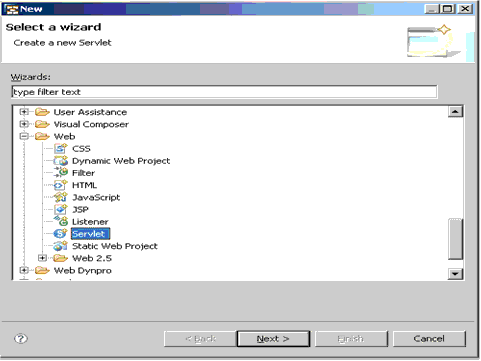
-
Enter the Java package as com.test and class name as ARFC2GenericServlet . Click Next .
-
Leave the other entries unchanged and click Finish .
-
In the Project Explorer, open the context menu for ARFC2Generic and select
Build Path Configure Build Path . Select the
Libraries tab
page and then select
Add External JARs .Navigate to the following paths to add the external JARS one after the other.
-
<J2ee_engine_install_path>/<SID>/J0x/j2ee/cluster/bin/ext/tc~cm~arfc2/ and select cm_arfc2_api.jar. Click OK .
-
<J2ee_engine_install_path>/<SID>/J0x/j2ee/cluster/bin/ext/com.sap.tc.cmi/lib and select com.sap.tc.cmi_api.jar. Click OK .
-
<J2ee_engine_install_path>/<SID>/J0x/j2ee/cluster/bin/ext/tc~cm~base/lib and select cmi_baseimpl_api.jar. Click OK .
-
<IDE_install_path>\eclipse\plugins\com.sap.mw.jco3_<build_number>\lib and select sapjco3_IDE.jar. Click OK .
-
-
Declare the following variables in the servlet class that you have created:
String[] rfmName = {"BAPI_FLIGHT_GETLIST"}; // RFM to be executed
String metadataDestination = "WD_RFC_METADATA_DEST"; // Metadata destination on NWA
String modelDestination = "WD_MODELDATA_DEST"; // Model Execution Destination on NWA
String postFix = "_Input"; // postfix for naming input modelClass
String outputRelation = "Output"; // the output relation
Create the two new JCo destinations WD_RFC_METADATA_DEST and WD_MODELDATA_DEST in the SAP NetWeaver Administrator.
More information: SAP JCo Configuration
-
Inside the doGet() method, insert the following code snippet:
PrintWriter writer = response.getWriter(); response.setContentType("text/html"); writer.println("<HTML><BODY>"); //Create the modelInfo for the ARFC2 model writer.println("<P>1...Creating Metadata"); ARFC2ModelInfo modelInfo = createMetadata(); //Create the ARFC2 model writer.println("<P>2..Creating Model"); ARFC2Model model = new ARFC2Model(modelInfo, modelDestination); //Create the executable model object writer.println("<P>3..Creating Executable Model Object (Input Model Object)"); ARFC2GenericModelClassExecutable executable = (ARFC2GenericModelClassExecutable)model.createModelObject((new StringBuilder("Bapi_Flight_Getlist")).append(postFix).toString()); //Execute the executable model object executeModelObject(executable, writer); writer.println("Execution successfully completed"); writer.println("</BODY></HTML>"); -
Introduce the two functions into the servlet class, as shown below:
private ARFC2ModelInfo createMetadata() {
                ARFC2ModelInfo modelInfo = ARFC2ModelInfo.importMetadataFromBackend("Metadata", Locale.getDefault(), rfmName, metadataDestination, new HashMap(), null, null);

//No changes to metadata are allowed after the next step
                modelInfo.finishMetadataCreation();
                return modelInfo;
        }

private void executeModelObject(ARFC2GenericModelClassExecutable executable, PrintWriter writer)
    {
        try
        {
            writer.println("<P>4..setting input Model Object params");
            executable.setAttributeValue("Max_Rows", Integer.valueOf(500));

            writer.println("<P>5..Execute");
            executable.execute();

            writer.println("<P>6..get output ModelObject");
            ARFC2GenericModelClass outputObj = (ARFC2GenericModelClass)executable.getRelatedModelObject(outputRelation);
            Collection collection = outputObj.getRelatedModelObjects("Flight_List");
            Iterator iterator = collection.iterator();
            int i = 0;
            writer.println("<P>7..Iterate results");
            writer.println("<table border = 1>");
            writer.println("<tr><td>Airline ID</td><td>Airline</td><td>Connect ID</td><td>Flight Date</td><t" +
"d>Airport From</td><td>City From</td><td>Airport To</td><td>City To</td><td>Dep " +
"time</td><td>Arr Time</td><td>Currency</td><td>Currency_ISO</td></tr>"
);
            for(; iterator.hasNext(); writer.println("</tr>"))
            {
                ARFC2GenericModelClass modelClass = (ARFC2GenericModelClass)iterator.next();
                writer.println("<tr>");
                writer.println((new StringBuilder("<td>")).append((String)modelClass.getAttributeValue("Airlineid")).append("</td>").toString());
                writer.println((new StringBuilder("<td>")).append((String)modelClass.getAttributeValue("Airline")).append("</td>").toString());
                writer.println((new StringBuilder("<td>")).append((String)modelClass.getAttributeValue("Connectid")).append("</td>").toString());
                writer.println((new StringBuilder("<td>")).append(modelClass.getAttributeValue("Flightdate")).append("</td>").toString());
                writer.println((new StringBuilder("<td>")).append((String)modelClass.getAttributeValue("Airportfr")).append("</td>").toString());
                writer.println((new StringBuilder("<td>")).append((String)modelClass.getAttributeValue("Cityfrom")).append("</td>").toString());
                writer.println((new StringBuilder("<td>")).append((String)modelClass.getAttributeValue("Airportto")).append("</td>").toString());
                writer.println((new StringBuilder("<td>")).append((String)modelClass.getAttributeValue("Cityto")).append("</td>").toString());
                writer.println((new StringBuilder("<td>")).append(modelClass.getAttributeValue("Deptime")).append("</td>").toString());
                writer.println((new StringBuilder("<td>")).append(modelClass.getAttributeValue("Arrtime")).append("</td>").toString());
                writer.println((new StringBuilder("<td>")).append(modelClass.getAttributeValue("Curr")).append("</td>").toString());
                writer.println((new StringBuilder("<td>")).append(modelClass.getAttributeValue("Curr_Iso")).append("</td>").toString());
            }

            writer.println("</table>");
        }
        catch(Exception e)
        {
            writer.println("<P>***Exception while execution");
        }
    }
If you get any compilation errors, then right-click anywhere in the Java Editor, select Source and then select Organize Imports.
-
In the Project Explorer, under ARFC2Generic project, expand the Java Resources: src node and in the context menu of the ARFC2GenericServlet.java , select
Run
As Run on Server.
-
In this screen, select the SAP Server (J2EE engine) that you want to run the application on and click Next.
-
Ensure that ARFC2GenericEAR is present under the Configured projects . Click Finish.
Results
A pop up appears if the deployment is successful. Click OK , and the results of the application execution are displayed on a servlet within the SAP NetWeaver Developer Studio.