Using Timers
The EJB Timer service is a container-managed service that provides methods to allow callbacks to be scheduled for time-based events.
You can use the Timer service only for stateless session and message-driven beans.
There are four TimerService.createTimer() methods, which create a timer with a different type of configuration. The types are:
-
single-event timer that expires once;
-
interval timer that expires repeatedly at a specified interval.
When the time expires the Timer service calls the bean's ejbTimeout() method or a callback method annotated with @javax.ejb.Timeout .
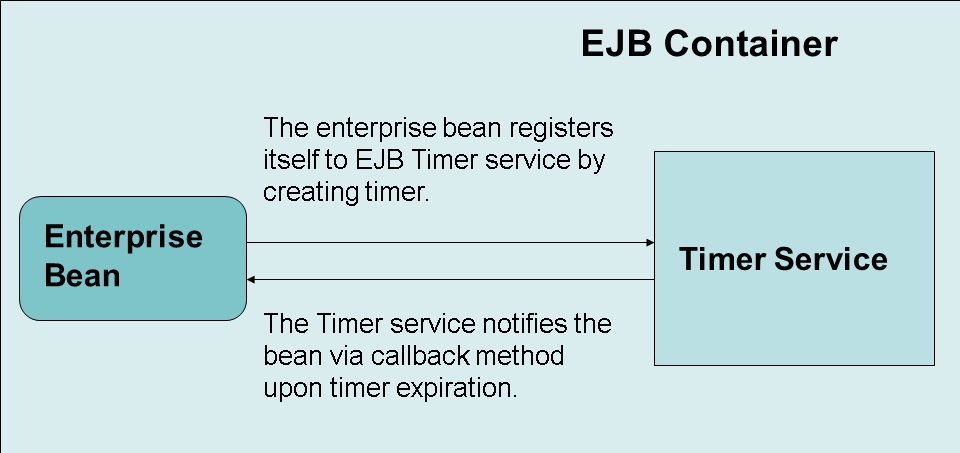
An enterprise bean typically creates a timer within the scope of a transaction. If the transaction is then rolled back, the timer creation is rolled back.
This is an example of an e-mail account manager with a timer. If you do not access the e-mail for 30 days, the account is removed.
First you create a single-event timer that expires 30 days after the e-mail account is created. Every time the user accesses the account, the timer is cancelled and set again.
You also have a timeout callback method, which is called when the timer expires, this means that the user has not accessed the account for more than 30 days.
Creating the Timer
To create a timer, you use the appropriate createTimer() method.
@Stateless

public class EmailManagerFacadeBean implements EmailManagerFacadeRemote {

   private final long THIRTY_DAYS = 1000 * 60 * 60 * 24 * 30;


   @Resource

   private TimerService timerService;


   public void createEmailAccount(String emailAddress) {

      // Source code for creating the actual e-mail account

      // ......


      // Set e-mail account expiration in 30 days if not accessed

      timerService.createTimer(THIRTY_DAYS, emailAddress);

   }
Canceling the Timer
To cancel the timer, you call the timer's cancel method.
   public List<String> getMessages(String emailAddress) {


      // cancel the timer when the e-mail account is accessed

      Collection<Timer> timers = timerService.getTimers();

      for (Timer timer : timers) {

         if (emailAddress.equals(timer.getInfo())) {

            timer.cancel();

         }

      }


      // create a new timer that expires in 30 days

      timerService.createTimer(THIRTY_DAYS, emailAddress);


      // Source code for fetching the email messages

      // ........

   }
Creating the Timeout Callback Method
To register an enterprise bean class of a stateless or message-driven bean with the Timer service for timer callbacks, you have to provide a timeout callback method using the @Timeout annotation. You can use this annotation only once in a bean class.
   @Timeout

   public void removeEmailAccount(Timer timer) {

      String emailAddress = (String) timer.getInfo();


      // Source code for removing the e-mail account

      // ........

   }

}
Annotation Reference
|
Name |
Use |
Target |
|
@Timeout |
Use it to designate a timeout method. |
METHOD |