Content Server and Cache Server Monitoring


Content Server and Cache Server Monitoring
Use
The HTTP Content Server is monitored automatically as part of the Computer Center Management System (CCMS). For further information on the CCMS, see
 Monitoring in the CCMS and
Alert Monitor.
Monitoring in the CCMS and
Alert Monitor.
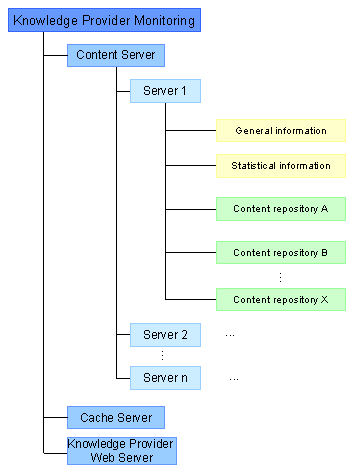
All repositories defined in Customizing are monitored, along with their associated content servers. A monitoring function for Web servers and cache servers recognized by Customizing is also provided.

The Knowledge Provider Web Server is only used within the framework of SAP Knowledge Warehouse. It is used for displaying content on the client. For example, a client wants to display a specific instance of a logical document. To do so, it sends the information on the logical document and its attributes (for example, logon language, release) via RFC to an SAP system. The SAP system returns the corresponding physical document via RFC to the client, which then displays it using the Knowledge Provider Web Server.
To go from the CCMS (transaction
RZ20) to the monitoring screen for the Content Server and Cache Server, choose SAP CCMS Monitors for Optional Components. Then choose the monitor for Knowledge Provider.Features
You can call up the following information in the monitoring function:
Prerequisite: the repositories are defined in Customizing (see
Prerequisite: the Cache Servers are defined in Customizing (see
Prerequisite: Customizing recognizes the Web servers. The Web servers are stored either with the classes (see
Monitoring has the following functions:
This function provides information on, for example, which SAP system the Web server is connected to, which message server is being used, details of the last access attempt on the server, and so on.
You can switch between Open Alerts and Current Status modes. If you are in Open Alerts mode, you can display and complete (that is, process) alerts.
If you are in Current Status mode, you can also go directly from the monitoring function for Content and Cache Servers to the administration function for Content and Cache Servers (see
Administration). To do so, double-click on the name of the required server or repository.
Information on monitoring in the CCMS is available in English.