
 Example: Deadline Monitoring for Receipt of a
Response Message
Example: Deadline Monitoring for Receipt of a
Response Message

It is often the case that a business system sends a request message (for example, a purchase order) and waits for a response message (for example, a response to a purchase order) from another business system.
If you want to monitor whether the response message is received within the predefined deadline, you must define an integration process for this particular message exchange. To monitor the deadline, you define a block with a deadline branch in the integration process.
You can define how the integration process reacts to deadline that is not met in different ways. The following table shows the various options. You can find the examples in the Integration Repository under SAP Basis → SAP Basis 6.40, namespace http://sap.com/xi/XI/System/Patterns.
Reaction |
Description |
Example |
Alert |
When a deadline is not met, an alert is triggered and the process continues to wait for the response message to be received. |
BpmPatternReqRespAlert
|
Terminate with Error Message |
When a deadline is not met, an exception is thrown. An error message is created in the relevant exception handler and then sent. |
BpmPatternReqRespTimeOut |
Example Process
The first receive step receives the request message, starts the process, and activates the correlation Correlation. The correlation links the request and response messages by means of an ID (for example, a purchase order number). The subsequent send step sends the message according to the receiver determination configured in the Integration Directory.
The receive step for receiving the response message uses the correlation Correlation. A subsequent send step then sends the response message according to the receiver determination configured in the Integration Directory. To be able to define deadline monitoring for both steps, they were defined within a block with a deadline branch.
Create Alert when Deadline is Not Met
The following graphic illustrates the process definition:
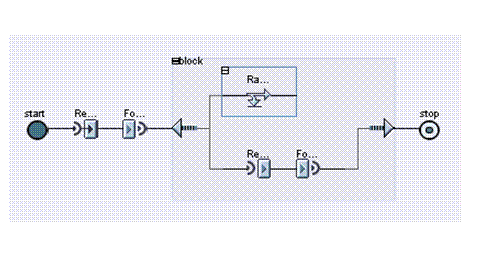
If the block is not finished 24 hours after it was created, the deadline branch is executed. In the example, the control step in the deadline branch triggers an alert. The receive step continues to wait for the response message to be received.
Terminate with Error Message when Deadline is Not Met
The following graphic illustrates the process definition:
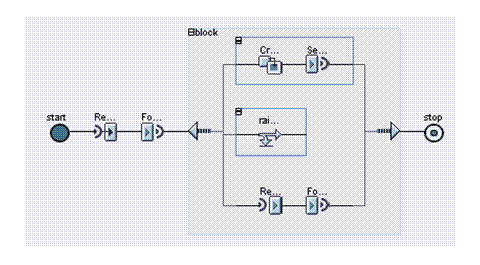
If the block is not finished 24 hours after it was created, the deadline branch is executed. In the example, the control step in the deadline branch triggers an exception. Processing continues in the relevant exception handler branch. In the exception handler branch, a transformation step creates an error message. The error message contains the ID from the request message with which the correlation Correlation was activated. If the ID is a purchase order number, for example, you can see which purchase order number has not yet received a purchase order response.
A subsequent send step then sends the error message according to the receiver determination configured in the Integration Directory. The block is now fully processed.