 Panel
Panel 
A Panel is a container-type UI element that is similar to a Tray. You can use a Panel or a ROOTUIELEMENTCONTAINER.
|
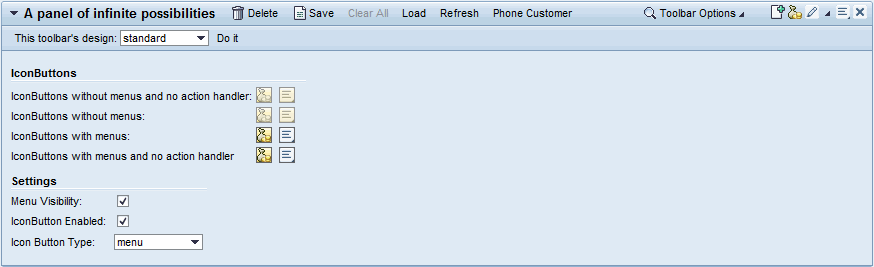 (Panel)
Unlike a Tray a Panel has a toggle button, which is displayed in the form of a small triangle in the top left corner. (A Tray has a square button that is displayed in the top right corner).
Different to a Tray the height property specifies the full height of Panels, including header and ToolBar. In a Tray the height specifies only the height of the content area, so without the header and ToolBar.
 Note
Note
To avoid confusion with Tray, you should not use Tray and Panel together on the same screen.
Implementation Details
Runtime Class |
CL_WD_PANEL |
Name |
Type |
Initial Value |
Bindable |
|---|---|---|---|
STRING |
(automatic) |
No |
|
Translatable text |
Yes |
||
WDUI_PANEL_CONTENT_DESIGN |
transparent |
Yes |
|
WDUI_CONTENT_PADDING |
standard |
Yes |
|
WDUI_CONTEXT_MENU_BEHAVIOUR |
inherit |
No |
|
WDY_MD_UI_ELEMENT_REFERENCE |
No |
||
WDY_MD_UI_ELEMENT_REFERENCE |
Yes |
||
WDY_BOOLEAN |
true |
Yes |
|
WDY_BOOLEAN |
true |
Yes |
|
WDY_BOOLEAN |
true |
Yes |
|
WDY_BOOLEAN |
false |
No |
|
WDUI_PANEL_HEADER_DESIGN |
standard |
Yes |
|
STRING |
Yes |
||
STRING |
Yes |
||
WDY_BOOLEAN |
false |
No |
|
WDUI_SCROLLING_MODE |
none |
Yes |
|
Translatable text |
Yes |
||
WDY_BOOLEAN |
true |
Yes |
|
Translatable text |
Yes |
||
WDUI_VISIBILITY |
visible |
Yes |
|
STRING |
Yes |
Name |
Cardinality |
Type |
|---|---|---|
0..n |
||
0..1 |
||
0..1 |
||
0..n |
||
0..1 |
||
0..1 |
Note
Other properties that can be inherited are defined in the related higher-level classes. The related UI elements are:
Dynamic Programming
For dynamic programming, the same properties, events and aggregations are available as in the View Designer. But note that the spelling format and use of upper/lower case is different.
View Designer Name |
Runtime Name |
Type |
|---|---|---|
ACCESSIBILITY_DESCR |
WDY_MD_TRANSLATABLE_TEXT |
|
CONTENT_DESIGN |
WDUI_PANEL_CONTENT_DESIGN |
|
contentDesign: fill |
CL_WD_PANEL=>E_CONTENT_DESIGN-FILL |
|
contentDesign: plain |
CL_WD_PANEL=>E_CONTENT_DESIGN-PLAIN |
|
contentDesign: transparent |
CL_WD_PANEL=>E_CONTENT_DESIGN-TRANSPARENT |
|
CONTENT_PADDING |
WDUI_CONTENT_PADDING |
|
contentPadding: none |
CL_WD_PANEL=>E_CONTENT_PADDING-NONE |
|
contentPadding: standard |
CL_WD_PANEL=>E_CONTENT_PADDING-STANDARD |
|
CONTEXT_MENU_BEHAVIOUR |
WDUI_CONTEXT_MENU_BEHAVIOUR |
|
contextMenuBehaviour: inherit |
CL_WD_PANEL=>E_CONTEXT_MENU_BEHAVIOUR-INHERIT |
|
contextMenuBehaviour: provide |
CL_WD_PANEL=>E_CONTEXT_MENU_BEHAVIOUR-PROVIDE |
|
contextMenuBehaviour: suppress |
CL_WD_PANEL=>E_CONTEXT_MENU_BEHAVIOUR-SUPPRESS |
|
CONTEXT_MENU_ID |
WDY_MD_UI_ELEMENT_REFERENCE |
|
DEFAULT_BUTTON_ID |
WDY_MD_UI_ELEMENT_REFERENCE |
|
ENABLED |
WDY_BOOLEAN |
|
EXPANDABLE |
WDY_BOOLEAN |
|
EXPANDED |
WDY_BOOLEAN |
|
HANDLE_HOTKEYS |
WDY_BOOLEAN |
|
HEADER_DESIGN |
WDUI_PANEL_HEADER_DESIGN |
|
headerDesign: standard |
CL_WD_PANEL=>E_HEADER_DESIGN-STANDARD |
|
headerDesign: underline |
CL_WD_PANEL=>E_HEADER_DESIGN-UNDERLINE |
|
HEIGHT |
STRING |
|
IMAGE_SOURCE |
STRING |
|
IS_DRAG_HANDLE |
WDY_BOOLEAN |
|
SCROLLING_MODE |
WDUI_SCROLLING_MODE |
|
scrollingMode: auto |
CL_WD_PANEL=>E_SCROLLING_MODE-AUTO |
|
scrollingMode: both |
CL_WD_PANEL=>E_SCROLLING_MODE-BOTH |
|
scrollingMode: none |
CL_WD_PANEL=>E_SCROLLING_MODE-NONE |
|
TITLE |
WDY_MD_TRANSLATABLE_TEXT |
|
TITLE_EDITABLE |
WDY_BOOLEAN |
|
TOOLTIP |
WDY_MD_TRANSLATABLE_TEXT |
|
VISIBLE |
WDUI_VISIBILITY |
|
visible: none |
CL_WD_PANEL=>E_VISIBLE-NONE |
|
visible: visible |
CL_WD_PANEL=>E_VISIBLE-VISIBLE |
|
WIDTH |
STRING |
|
View Designer Name |
Runtime Name |
Cardinality |
|---|---|---|
CHILDREN |
0..n |
|
DRAG_SOURCE_INFO |
0..1 |
|
DROP_TARGET_INFO |
0..1 |
|
HEADER_FUNCTIONS |
0..n |
|
HEADER_TOOLBAR |
0..1 |
|
TOOLBAR |
0..1 |
Example
You can find a test example in the system in the WDR_TEST_PANEL component.