
 Setting the System Change Option

Use
The system change option controls whether Repository objects and cross-client Customizing objects are modifiable or not.
The system change option does not affect client-specific Customizing changes. To set whether these changes can be made or not, go to Client Control.
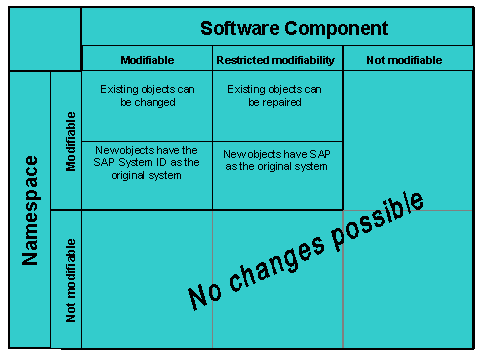
You can make more precise settings for Repository objects: each Repository object is in a software component and a namespace or name range. For a Repository object to be modifiable, all the following settings also need to be set to modifiable:
· The global setting
· The software component of the object
· The namespace or name range
You can set the Repository objects in a particular software component to Modifiable, Restricted modifiability, or Not modifiable. Restricted modifiability means that you can create Repository objects in this software component as non-original objects only.

Restricted modifiability is the same as Modifiable for packages.
You can set the Repository objects in a particular namespace to Modifiable or Not modifiable.
The SAP System logs this activity. Choose Log to display the settings log.
Prerequisites
To set the system change option, you require the administration authorization in the CTS. This is included in the standard authorization S_CTS_ADMIN.
Procedure
To set the system change option, proceed as follows:
...
1. In the Transport Organizer (transaction SE09), choose Goto → Transport Organizer Tools.
This takes you to the Transport Organizer Tools overview.
2. Go to Administration and start the program Set System Change Option.
The Global setting option allows you to determine whether or not objects from the Repository or client-independent Customizing are globally modifiable.
Only if the global setting is set to modifiable, can you set the system change option of the software components and the namespaces and name ranges.
By choosing Edit → Namespaces modifiable and Edit → Own Namespaces Modifiable, you can set the namespaces and name ranges to Modifiable for all objects or for your own objects.

If you want to change the objects in your customer name range, set the software componentsLOCAL and HOME and the customer name range to Modifiable. This customer name range includes, for example, all reports beginning with Z or Y.
If you want to create or edit local objects in your SAP System, you must set the software component LOCAL and the customer name range to Modifiable.