 Measurement Overview
To open the analysis overview, choose Analyze from the initial screen of the runtime analysis transaction.
Example:
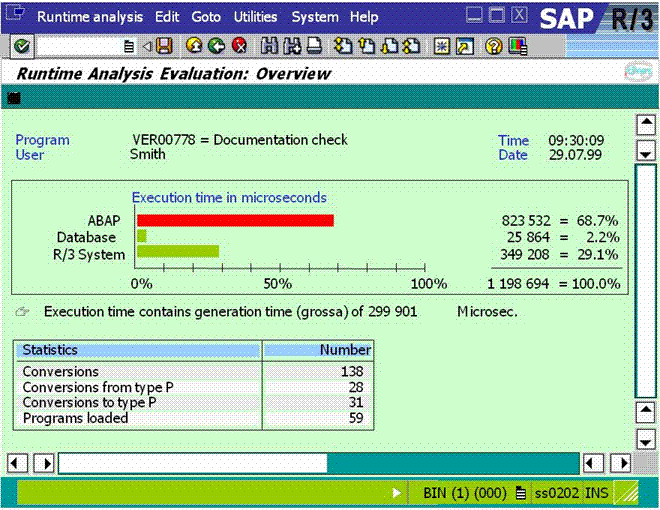
The analysis overview contains general information about the performance of your program. Along with displaying the program's overall execution time in microseconds, the overview presents you with a bar chart, statistics, and the maximum memory required by a call.
Bar Chart
The bar chart displays the total runtime required for
The ABAP interpreter
The database
System statements.
With the ABAP and system statements, a green bar indicates that the corresponding statements required less than 50% of the total runtime. A red bar indicates that one of the statement categories required more than 50% of the total runtime. With the database operations, a red bar appears if this category required more than 25% of the total runtime.
If the system had to generate a program during the runtime analysis, it reports the fact below the bar diagram. In this case, the total runtime includes the time required for the program generation.
Statistics
The statistics entries in the lower part of the overview screen display how often certain actions take place in the runtime of an application. The frequency of the following actions is measured:
All conversions
Conversions to type P
Conversions from type P
Loading programs
The number of conversions to and from type P is also contained in the overall number of conversions. If you double-click a line in the statistics display, you can display the list of the objects responsible for the action in question.