
 Change
and Transport Lists for CTS Transports
Change
and Transport Lists for CTS Transports

Use
A change list enables a collective release of changes to various objects in the Integration Repository or Integration Directory. With regard to transports, it stands to reason that those objects that have been changed are exactly those objects that you want to transport. Transporting on the change list level therefore simplifies the selection of changed objects during development.
Alternatively, you can group transport lists containing object sets that are independent of a change list together in the transport wizard.
Features
Creating Transport or Change Lists
·
Transport
Lists
The Integration Builder creates a transport list when you group objects
together by using the transport wizard in Transporting with CTS mode. The name of the transport list is
displayed later during the transport. Once you have performed all the steps in
the transport wizard, the Integration Builder transfers the transport list
directly to CTS and displays it on the Change Lists tab page. As usual,
the Integration Builder exports the last active version of the
objects.
·
Change
Lists
The Integration Builder creates a standard change list as soon as an object is
saved or deleted by a user who has not yet been assigned a change list.
During
activation, the system prompts to provide a meaningful name for the change
list. This helps to identify the change list at a later point of time, for
example, while importing the change lists. During export of multiple change lists in a single
transport request, the name of the first change list is used as the
description of the transport request.
After activation, an open change list has the status transportable. You can then either transfer the change list to CTS (context menu Transport) or close the change list (Close Without Transport) on the Change Lists tab page. In the first case, the Integration Builder exports the changes contained in the change list. This corresponds to the object versions at the time of release of the change list (see the example below).

In the Integration Repository, the export of objects is generally restricted to one software component version. Therefore, you cannot include objects from change lists of different software component versions in an export.
Status of Change Lists and Transport Lists
The following figure gives you an overview of the different statuses that change lists and transport lists can have:
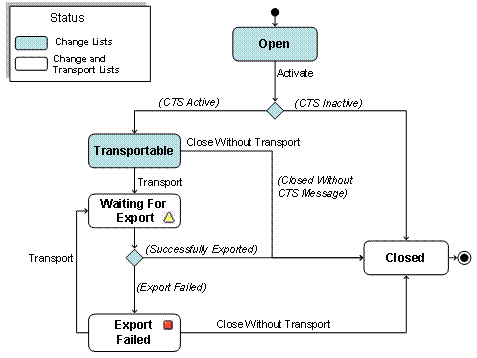
The different statuses are displayed in the quick info for either the transport or change list, and when searching for transports.
Example
You want to transport a change list with CTS. Once you have activated the change list, the Integration Builder moves it to the Transportable branch of the Change Lists tab page.
The Integration Builder transfers open change lists of software component versions that are not entered in CTS directly to the Closed branch at release.
In this way, when you release changes, the intermediate Transportable status gives you control over whether and when changes are transported.
You can make new changes to objects in transportable change lists before transport. The result of this is that different versions of an object can exist in different transportable change lists. The following figure provides an example:
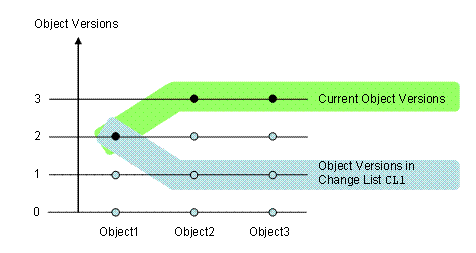
The transportable change list CL1 contains three objects. At the time CL1 was released, both objects Object2 and Object3 had version 1 and Object1 had version 2. After this, the objects Object2 and Object3 were changed using other change lists. You now have the following options:
· To transport the object versions in change list CL1, use the Release for CTS Transport function on the Change Lists tab page.
· To transport the current object versions, create a transport list by using the transport wizard.