
 Creating a Rule-Based GRMG Monitor

Use
After you have completed the Customizing, the GRMG monitoring data is available to you in the Alert Monitor. You can use existing monitors to display the data (see Displaying the Availability Monitoring with the GRMG in the Alert Monitor).
You can, however, also use your own monitors by creating a rule-based monitor definition. This is explained in this section. For general information about monitor definitions, see Creating and Changing Monitors.
Prerequisites
You have performed the customizing of the GRMG monitoring.
Procedure
1. Choose CCMS →Control/Monitoring → Alert Monitor, or call transaction RZ20.
2. Choose Extras →Activate Maintenance Functions.
3.
Choose the monitor
set in which you want to create the monitor and choose  Create.
4.
Now create a rule
node. To do this, choose the Create Node button, and choose the radio button Rule
Node on the following
screen, then choose  Continue.
5.
Select the rule
CCMS_GET_MTE_BY_CLASS_AND_OPTIONS, choose the Continue button, and specify the following values for this
node on the following screen:
Parameter |
Value |
R3System |
<CURRENT> |
MTEClass |
GRMG_<scenario name> |
You can also used the wildcard character (*) for the parameter MTEClass, to be able to display multiple scenarios in the monitor. This can be useful, for example, if an application makes multiple scenarios available for availability monitoring with the GRMG. The naming convention for scenario names is then <Application>_<Subapplication>, meaning that with MTEClass = GRMG_<application>*, the monitor would display all scenarios for the corresponding application.

The name of the scenario is the value of the scenname element of the Customizing file (in this example, WDADM630). It is displayed in transaction GRMG (see Additional Settings for Availability Monitoring with the GRMG).
6. After creating this rule node, this part of the monitor definition looks like this:

7. Save the monitor definition. The system prompts you to enter a name for your monitor.
Result
The final monitor looks like this:
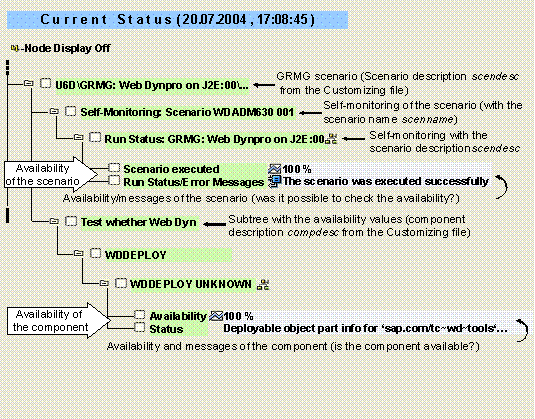
 Monitoring with the
Generic Request and Message Generator start page
Monitoring with the
Generic Request and Message Generator start page