
 Selfmonitoring CCMS Agents
Monitor
Selfmonitoring CCMS Agents
Monitor

Use
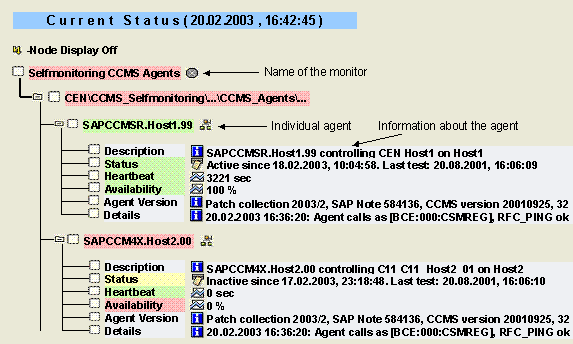
Use this monitor to monitor the CCMS agents in your IT landscape. In addition to the RFC destination of the agent, the monitor provides the following information about each agent:
● The host on which the agent was installed
● The application server that the agent is checking (for agent SAPCCM4X)
● How long the agent has been active or inactive, and when it was last checked
● The availability of the agent
Features
The following agents that are registered with the local system have at least one subtree of their own in this monitor:
● CCMS agents (SAPCCMSR, SAPCM3X, SAPCCM4X)
●
 CCMSPING (but only
if the agent was registered with the option –push)
CCMSPING (but only
if the agent was registered with the option –push)
The name of the subtree is the same as the RFC destination of the agent and has the following structure:
<Type of agent>.<Name of host system>.<System number of monitored instance>
Each of these subtrees consists of the following monitoring tree elements (MTEs):
MTE Name |
Description |
Description |
Information about which application server on which host is monitored by the agent |
Status (CsmTaskCcmsAgent.Status) |
Information about whether the agent is active or inactive and how long it has been in that state |
Heartbeat (CsmTaskCcmsAgent.Heartbeat) |
Time since the last test of whether the agent is still active; if the agent is inactive, this attribute contains the value 0 sec |
Availability (CsmTaskCcmsAgent.Availability) |
Percentage of the time in which the agent is active (by default in the last 15 minutes; you can change the time period in the Properties of the MTE class) |
Agent Version (CsmTaskCcmsAgent.Version) |
Static information about the agent used; corresponds to the following entries when –V is displayed (see Controlling CCMS Agents): ● CCMS version ● systemid ● relno ● Patch text |
Details (CsmTaskCcmsAgent.Details) |
Information about the central monitoring system user to which the agent sends data and alerts as an RFC client; also the current status of the RFC connection used to do this |
Activities
To start the monitor, follow the procedure below:
...
1. Start the Alert Monitor using transaction RZ20 or choose CCMS →Control/Monitoring → Alert Monitor.
2. On the CCMS Monitor Sets screen, expand the SAP CCMS Technical Expert Monitorset.
3. Start the Selfmonitoring CCMS Agents monitor from the list by double-clicking it.