
 Implementing a Federated Portal
Network
Implementing a Federated Portal
Network

Organizations can implement a federated portal network using the SAP NetWeaver platform to share content between portals.
A federated portal network allows organizations with distributed portal installations, both SAP and non-SAP, to provide a single portal access point per user to portal information, services and applications distributed on portals throughout the entire organizational network. This implementation allows existing content and configurations to be utilized, and to minimize necessary administration efforts.
For more information about this scenario variant, see
 Implementing a
Federated Portal Network.
Implementing a
Federated Portal Network.
For a list of terms
used in this scenario variant, see
Glossary.
Getting Started
For basic
information on using a portal, see the
Portal section in
Getting
Started – Using SAP Software.
System Landscape
Each portal in the federation can be a producer, consumer, or both, depending if it exposes its content outward for other portals or if it uses remote content exposed by other portals.
● Producer: A portal installation that provides other portals (consumers) with remote access to its locally deployed content.
● Consumer: A portal installation that accesses the remote content provided by another portal (a producer).
SAP NetWeaver Portal supports the WSRP standard facilitating portlet interoperability. This allows you to: (i) incorporate WSRP-compliant portlets deployed on a non-SAP portal into the NetWeaver federation; and (ii) expose WSRP-compliant NetWeaver content for use by a non-SAP portal.
A NetWeaver consumer portal can use remote content in different ways:
●
Assign users to
remote roles that are defined, configured, and maintained on another portal
(producer). For more information, see
'Remote Role
Assignment' Mode.
●
Create remote delta
links to content (iViews, pages, worksets, and roles) residing on a remote
producer portal, reuse it, and then customize it locally without affecting the
source content on the producer. As with standard delta links behavior, changes
to source objects on the producer are automatically updated on the consumer.
For more information, see
'Remote Delta Link'
Mode.
●
Integrate WSRP
portlets running on a non-SAP producer portal as local SAP NetWeaver iViews.
For more information, see
'WSRP Application
Sharing' Mode.
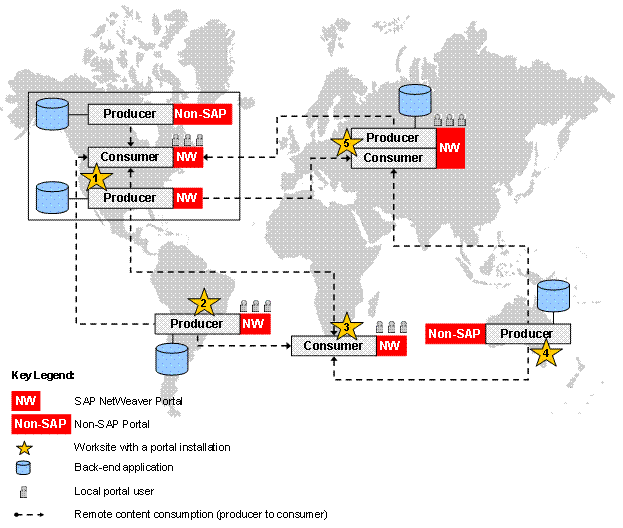
Figure: A federated portal network comprising five distributed locations on the same LAN, each with a different set of portal installations, sharing content with one another. Users log on to the portal in their location, but gain seamless access to backend applications residing in other locations on the network. The remote role assignment and remote delta link are used to share content between NetWeaver portals, while WSRP application sharing is used to share content between a NetWeaver portal and a non-SAP portal.
Each location is a producer, consumer, or both.
● Location 1 has three portal installations: a non-SAP portal, a NetWeaver content producer, and a NetWeaver consumer, which is the logon portal for all users in that location.
● Location 2 is a NetWeaver producer. It has its own users and local content, which it exposes outward, but does not consume remote content from other portals.
● Location 3 is a NetWeaver consumer that does not create or develop its own content, but serves its users with remote-based content only.
● Location 4 is a non-SAP producer. It does not serve any local users, but provides remote applications to other portals.
● Location 5 is a NetWeaver portal. It functions as dual producer and consumer, serving its users with local and remote-based content, and shares its content outward to another portal.
For examples of business scenarios implementing a federated portal network, visit the Implementing a Federated Portal Network area on SAP Developer Network at www.sdn.sap.com/irj/sdn/developerareas/ep.
Tools
For a summary of the tools used by administrators on tools used specifically to implement a federated portal network, see the following.
●
Portal Tools for
NetWeaver Producers
●
Portal Tools for
NetWeaver Consumers

A system
administrator can use an XML script instead of the editors and wizards in the
portal to perform many of the steps described below. For more information, see
Using XML to
Automate Federated Portal Network Tasks.
In addition to the producer and consumer-related activities performed by administrators on each NetWeaver portal installation in the federation, administrators should also perform the necessary on-demand and day-to-day administrative tasks to configure and maintain each portal independently. For more information, see Providing Uniform Content Access in this guide.
If you are integrating non-SAP portal into the federation, refer to the documentation supplied by the vendor.
Prerequisites
● For each NetWeaver portal (producer or consumer), you have installed the following SAP NetWeaver usage types:
○ Application Server Java (AS-Java)
○ EP Core (EPC)
○ Developer Infrastructure (DI)

Usage type DI is required only if you intend to self-develop applications and content for the portal.
●
After installing
usage type EPC on each NetWeaver portal (producer or
consumer), you have performed the mandatory initial configuration tasks
documented in
Initial Configuration
Tasks. Optional and recommended tasks should also be
considered.
Make sure you adhere to the portal permission configuration guidelines as described in the aforementioned documentation reference. By not doing so, you run the risk that a portal may lack the correct runtime permissions when it is created and be unable to access its assigned initial content.
●
The same user base
applies to both the producer and the consumer portal (only required for
NetWeaver-based producers and consumers). See
User
Persistence.
● NetWeaver portals are all running SAPNetWeaver 7.0.
For information
about setting up a federated portal networking with a producer or consumer
portal running a higher version of SAP
NetWeaver 7.1, see
Version
Interoperability and SAP Note
880482.
● Non-SAP portals are all WSRP-compliant.
Limitations
See
Limitations, Known
Issues, and Workarounds.
Tasks
This section outlines the flow of tasks that administrators must perform to implement a federated portal network.
It is assumed that content has already been generated on the producer portal. Note that a producer portal can generate new content at any time and make it available to other consumers.
Note that the following process flow relates to a single producer-consumer relationship. Repeat the steps for each additional producer-consumer pairing.
Configuring the Federated Portal Network
Administrators on the producer and consumer portals perform the following steps to configure and integrate the portals into a federated portal network. The producer also makes the necessary configurations to expose its content to other consumers.
...
...
1.
Each producer and
consumer portal separately configures their user repository. See
User
Persistence.
2. The system administrator on each producer and consumer portal separately configures system settings to prepare for the implementation of the federated portal network.
NetWeaver Producer Portal |
NetWeaver Consumer Portal |
... b.
c.
d.
e.
|
... b.
c.
d.
e.
|
3.
The system
administrator on the consumer portal defines the producer. See
Adding
Producers.
4. The system administrator on the consumer portal configures the producer instance:
a.
Verify the producer
alias. See
Maintaining Producer
Aliases.
b.
Test the connection
to the producer. See
Testing the Connection
to a Producer.
c.
Register with the
producer portal. See
Registering and
Unregistering Your Consumer Portal.
d.
Assign permissions
to the producer instance. See
Assigning
Administrator Permissions to Producer Objects.
5.
The producer portal
sets permissions to its content and configures some necessary content
properties to expose the content to registered consumers. See
Exposing Content to
Consumers.
Creating Federated Portal Network Content
Administrators on the consumer portal perform the following steps to incorporate remote-based content into the portal and to assign it to local users.
...
1. Based on the desired content usage mode, an administrator on the consumer does any of the following:
a. The user administrator assigns users and groups to remote roles.
b. The content administrator copies remote NetWeaver content from a producer portal and creates delta link objects on the consumer portal.
c. The content administrator chooses remote portlets (from a non-SAP producer portal) or iViews (from a NetWeaver producer portal) and creates proxy-to-portlet iViews on the consumer portal.
For more
information, see
Getting Remote Content
from Producers.
2. The consumer configures the content. The steps to be performed depend on which content usage mode was used to create the content:
Remote role assignment |
No further work needs to be done on the consumer. The roles are ready to be used by their assigned business users. |
Remote delta link* |
... 1. The content administrator customizes the copied objects as necessary. 2. The content administrator assigns the content to local roles (required only if role structures are not copied). 3. The user administrator assigns copied roles or self-created roles to users. |
WSRP application sharing* |
... 1. The content administrator assigns proxy-to-portlet iViews to local pages, worksets, or roles. 2. The user administrator assigns local roles to users. |
* Content you create on the consumer through the remote delta link and WSRP application sharing modes is local content. It should be treated like any other standard content created on the portal. For information relating to these activities, see Creating Portal Content and Maintaining the Portal in Providing Uniform Content Access.
3. The consumer portal performs the following tasks:
○
Assigns end-user
permission to the producer instance and content that has been generated
locally. See
Assigning End-User
Permission to Producer Objects and Content.
○ Creates and develops local content directly on the consumer portal (optional).
After completing these steps, business users are already able to log on to the consumer portal and access portal information, services and applications distributed on portals over the entire organizational network.
Maintaining the Federated Portal Network
Administrators on the producer and consumer portals perform the following steps to ensure a stable and optimized portal environment in which business users can perform their daily tasks.
...
1.
System
administrators on the producer map remote users to local content accessed from
the consumer portal (optional for single sign-on capabilities). See
Single
Sign-On.
2. Content administrators on the consumer check the status and viability of content that is based on remote applications.
3. System administrators maintain the producer and consumer portals in the federation.
Steps include maintaining and monitoring connectivity between producer and consumer, consumers tracking active producers, and producers tracking registered consumers. For more information, see the following:
NetWeaver Producer Portal |
NetWeaver Consumer Portal |
|
●
●
|
Other tasks include those required to keep an independent portal up and running (see Maintaining the Portal in Providing Uniform Content Access).