
 Enqueue Monitor

Use
The enqueue service
allows ABAP applications to lock data so that only they can use it. The
locking of the data avoids parallel changes to the data, which would lead to
data inconsistency. For more information, see
 The SAP Lock Concept
(BC-CST-EQ).
The SAP Lock Concept
(BC-CST-EQ).
Features
In the monitoring infrastructure, there are various subtrees for monitoring the enqueue. These are combined in this monitor:
Subtree Enqueue → Enqueue Server
This subtree
includes a large number of monitoring values for the enqueue service. Since
the monitor is supplied with values by an ABAP data collection method, the
values are updated every five minutes. The subtree is constantly supplied with
values, regardless of whether the enqueue service is running on a normal
instance or is implemented as a
standalone enqueue
server.
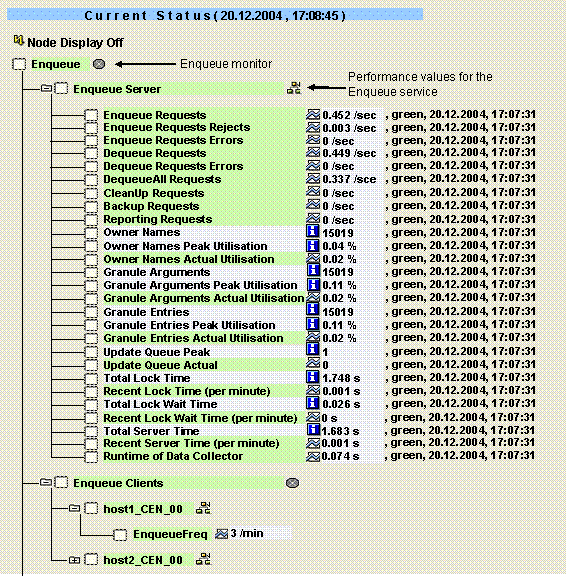
The following table provides information about the monitoring tree elements (MTEs) of this subtree:
MTE Name |
Meaning |
Enqueue Server |
Enqueue server that provides the enqueue service for the system |
Enqueue Requests |
Number of lock requests |
Enqueue Request Rejects |
Number of rejected lock requests |
Enqueue Requests Errors |
Number of errors that occurred during lock requests |
Dequeue Requests |
Number of release requests (DEQUEUE) |
Dequeue Requests Errors |
Number of errors that occurred when releasing locks |
DequeueAll Requests |
Number of releases of all locks of an LUW (such as at the end of an LUW) |
CleanUp Requests |
Number of releases of all locks of an application server (such as when the server is started or shut down) |
Backup Requests |
Number of update calls for which locks were forwarded to the update. The update process receives the lock owner ID of the caller, the caller receives a new lock owner ID. |
Reporting Requests |
Number of operations for reading the lock table. |
Owner Names |
Maximum number of lock owner IDs that can be stored in the lock table. Lock owner IDs are assigned to a user context or to an update request. |
Owner Names Peak Utilization |
Maximum number of lock owners that have been stored simultaneously in the lock table. |
Owner Names Actual Utilization |
Current number of lock owners in the lock table |
Granule Arguments |
Maximum number of different lock arguments that the lock table can contain; locks of different owners or with different lock modes, but with the same lock argument occupy one entry |
Granule Arguments Peak
Utilization |
Maximum number of different lock arguments that have been stored simultaneously in the lock table. |
Granule Arguments Actual
Utilization |
Current number of different lock arguments in the lock table |
Granule Entries |
Maximum number of elementary locks that the lock table can contain (each elementary lock occupies one entry) |
Granule Entries Peak
Utilization |
Maximum number of elementary locks that have been stored simultaneously in the lock table. |
Granule Entries Actual
Utilization |
Current number of elementary locks in the lock table |
Update Queue Peak |
Maximum number of open update requests with locks that has occurred so far |
Update Queue Actual |
Current number of open update requests with locks |
Total Lock Time |
Total time spent in the critical path of the lock table for lock operations |
Recent Lock Time (per minute) |
Time spent in the critical path of the lock table for lock operations (in seconds per minute) |
Total Lock Wait Time |
Total wait time of parallel processes before entering the critical path of the lock table |
Recent Lock Wait Time (per
minute) |
Wait time of parallel processes before entering the critical path of the lock table (in seconds per minute) |
Total Server Time |
Total time spent in the enqueue server |
Recent Server Time (per
minute) |
Total time spent in the enqueue server (in seconds per minute) |
Runtime of Data Collector |
Node that is assigned to the data collection method; this is used to monitor the runtime of each data collection |
Subtree <SysID>\<Instance with Enqueue Service>\...\Enqueue
This subtree includes only the most important monitoring values for the enqueue service. Since the data is supplied by an active data supplier directly from the kernel, current data is reported immediately in the monitoring infrastructure. However, this subtree does not exist if the enqueue service is implemented as a standalone enqueue server.
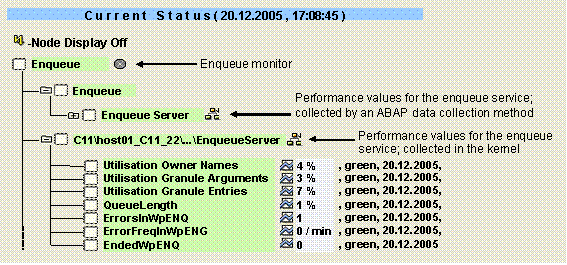
The subtree contains the following MTEs:
MTE Name |
Meaning |
<SysID>\<Instance>\...\EnqueueServer |
Subtree for the enqueue client; this only exists on the central instance |
Utilization Owner Names |
Current number of lock owners in the lock table as a percentage of the maximum number |
Utilization Granule Arguments |
Current number of different lock arguments in the lock table as a percentage of the maximum number |
Utilization Granule Entries |
Current number of elementary locks in the lock table as a percentage of the maximum number |
QueueLength |
Length of the enqueue queue as a percentage of its maximum length |
ErrorsInWpENQ |
Number of errors in the enqueue work processes since the monitoring segment was created (that is, since the application server was started) |
ErrorFreqInWpENQ |
Number of errors in the enqueue work processes per minute |
EndedWpENQ |
Number of enqueue work processes terminated after an error; you can use the Process Overview (transaction SM50) to determine whether a work process should be restarted after an error |
Subtree Enqueue Clients
Every instance of a system is connected to the enqueue service. This monitoring object contains performance attributes for requests from the other instances to this service.

The subtree contains the following MTEs:
MTE Name |
Meaning |
Enqueue Clients |
Performance attributes for requests from the instances to the enqueue service |
<Hostname>_<SysID>_<InstNo> |
Instance name |
EnqueueFreq |
Enqueue operations (logical data locks) per minutes that are coming from another instance to the central instance |
Subtree Connection to Standalone Enqueue
If the system
contains a
standalone enqueue
server, this subtree provides information about the status and high
availability configuration of that server.

The subtree contains the following MTEs:
MTE Name |
Meaning |
Connection to Standalone Enqueue |
Subtree for the standalone enqueue |
<host
name>_<SysID>_<Inst. No> |
Instance name |
Server |
Host on which the standalone enqueue server is running. |
Status |
Status of the standalone enqueue server |
Replication
Status |
Together with an enqueue replication server, the standalone enqueue server forms a high-availability enqueue server. If a replication server is installed, its current status is displayed here. |

The
instance-specific subtree containing information about the standalone enqueue
server is displayed for every instance that is monitored by the
CCMS agent
SAPCCM4X. This results in the following recommendations:
■
If you only want to
monitor the general availability of the standalone enqueue server, ensure that
at least one constantly-available instance is monitored with the SAPCCM4X
agent (see also
Installing an Agent on
an ABAP Instance).
■ If you also want to monitor the connection of every instance to the standalone enqueue server, ensure that all instances are monitored with the SAPCCM4X agent.
Activities
To start the monitor, follow the procedure below:
...
1. Start the Alert Monitor using transaction RZ20 or choose CCMS → Control/Monitoring → Alert Monitor.
2. On the CCMS Monitor Sets screen, expand the SAP CCMS Monitor Templates set.
3. Start the Enqueue Server monitor from the list by double-clicking it.