
 Creating an Instance of the Callable
Object
Creating an Instance of the Callable
Object

Prerequisites
You must hold the
portal role GP Business Expert, or have the relevant permissions to work with
Guided Procedures (GP) design time. For more information, see
 Portal Roles in
Business Expert Guide.
Portal Roles in
Business Expert Guide.
Procedure
...
1. Launch GP design time, as described in Launching Guided Procedures (GP) Design Time.
2. Choose Create Callable Object from the contextual panel.
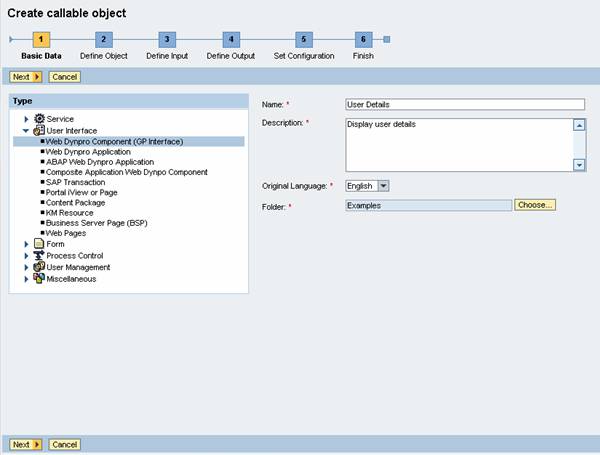
3. In the Basic Data screen, enter the following values for the required parameters:
○ Type – select User Interface → Web Dynpro Component (GP Interface)
○ Name –User Details, for example
○ Description –Display user details, for example
○ Original Language – select English
○ Folder – choose any folder in the gallery
Basic Data
4. Choose Next to open the Define Object screen.
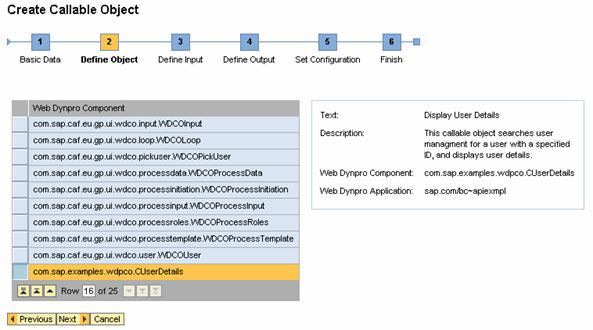
Select Web Dynpro component CUserDetails.

If you have created entries in the message pool for CO_NAME and CO_DESCRIPTION parameters, you will see the texts in the text box on the right-hand side of the screen.
Define Object
5. Choose Next to open the Define Input screen.
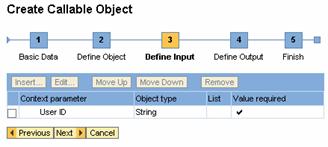
The system displays the input parameter User ID that you have defined into the component implementation. The name of the parameter is localized using the Web Dynpro message pool.
Define Input
6. Choose Next to open the Define Output screen.
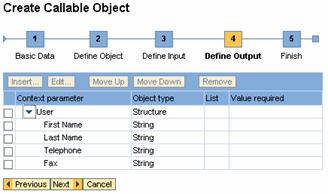
The system displays the output parameters that you have defined in the component implementation. The names of the parameters are localized using the Web Dynpro message pool.
Define Output
7. Choose Next, and then Finish and Open.
Result
You have opened the callable object design time.
Your next step is to test and activate the object.