 Using Additional Existing Database Fields


Using Additional Existing Database Fields
If customers want to include existing database fields in the BAPI, all they have to do is fill the BAPI table extension for this table with these fields (or create a BAPI table extension if none exists yet). This procedure is illustrated using BAPI TravelAgency.GetDetail. This BAPI is based on database table STRAVELAG, which contains the detail data for a travel agency.
The Existing Database Table
Table STRAVELAG contains the SAP-defined fields shown in the following diagram.
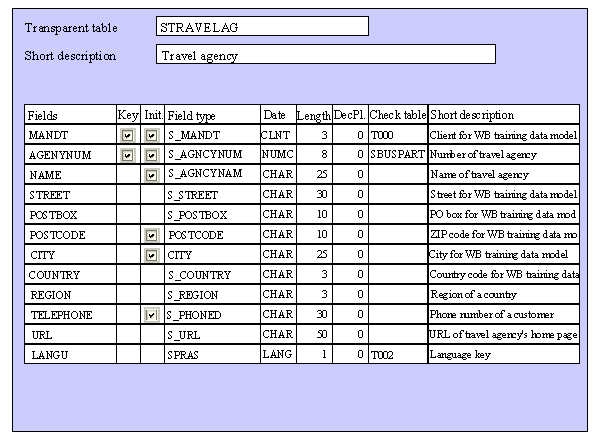
This table is used to return all the fields (except URL and LANGU) through the corresponding detail parameters of the BAPI supplied by SAP. To use the BAPI sensibly, however, the customer wants the BAPI to return these two additional fields as well.
To do this, the customer must first define the fields to include in the corresponding BAPI table extension.
The BAPI Table Extension
BAPI table extensions also perform their function for this type of enhancement, and the guidelines described above should be followed. Their general structure is also equivalent to that described under
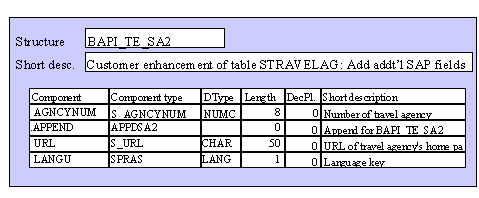
Appending Customer Fields – that is, it consists of a key part (usually defined by SAP) and a data part determined by the customer using the APPEND technique. The only difference is the way the data part is defined:The diagram below illustrates this situation.
Extension Parameters and BAPIs
The structure of the extension parameters in the BAPI interface and the way these containers are filled with data is equivalent to an enhancement that appends customer fields.