
 Block Design

Purpose
Blocks are the structural units that build a process in Guided Procedures. They are re-usable and may contain actions, nested blocks, or processes.
The block design defines how the items in the block are executed. You can choose to execute them sequentially, in parallel, in a loop, or let the user choose between several alternatives. This is defined by the block type.
Blocks have input and output contexts, as well as role contexts. The parameters and the roles are inherited from the items in the block, and can be consolidated at design time.
Prerequisites
To be able to create and edit blocks:
● You must hold the appropriate authorizations for the GP design time. For more information, see Portal Roles.
● You must have launched the gallery. For more information, see Launching Guided Procedures (GP) Design Time.
Process Flow
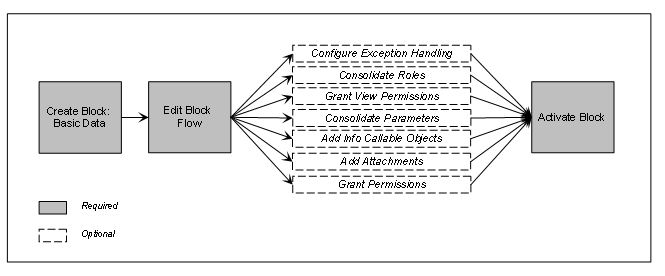
The process of designing a block goes through the following phases:
...
● Initially, you define the basic parameter of the block, such as its name, description, location, and so on.
● The next step of the process is to edit the block flow. This involves defining which items are included in the block, and the order, in which they are executed.
● Optionally, you can enhance the block definition by maintaining role or parameter consolidation, granting permissions for viewing the items in the block, and for modifying it, and so on.
● Finally, you activate the block to enable its use in a process template.
The process is illustrated in the figure below.
Designing a Block
See also:
Configuring Exception Handling
Activating Guided Procedures Content