
 Business Process Management

The efficiency of business processes is crucial for the long-term success of a company. In a fast-moving and changing business environment, the adaptability of business processes is a key factor for corporate success.
Business Process Management with SAP NetWeaver and ARIS for SAP NetWeaver provides procedure models, methods, technologies and reference content for modeling, configuring, executing and monitoring these business processes.
Process Modeling
A process model is an abstraction of a process and describes all the aspects of the process:
● Activities: steps that are executed within the process
● Roles: users or systems that execute the activities
● Artifacts: objects, such as business documents, for example, that are processed by the process
Processes within a company can be modeled on multiple abstraction levels and from numerous different viewpoints. To implement and utilize innovative processes and strategies successfully, you must convert business process views into technical views and relate both views. Typically, different individuals or departments within a company are responsible for modeling processes from the business and technical perspectives. A deciding factor for the success of business process modeling is, therefore, that all those involved have a common understanding of the business processes and “speak the same language”.
Process Configuration
It is vital that processes can be adapted to current situations and requirements in a quick and efficient manner. In doing so, it is important that changes or adjustments can be both documented and traced. This will enable those involved in later project phases or different projects to access and reuse process knowledge. Changes and adjustments must not lead to a discrepancy between the business view and the actual technical implementation.
Process Execution
Often, a variety of applications and systems need to be integrated within a company. Inflexible integration of individual systems generally leads to a large number of individual processes, each of which demands both time-consuming and costly maintenance and further development.
Monitoring
In today’s competitive business environment, business processes are often complex and extensive. Control and management of these business processes must incorporate both business and technical aspects.
Business Process Management in SAP NetWeaver
SAP NetWeaver offers users numerous advantages for all aspects of Business Process Management, and supports the entire life cycle of business processes – from planning, implementation, and monitoring, right up to optimization.
Common Methodology
Business Process Management in SAP NetWeaver provides a common methodology for all levels of process modeling. This common methodology forms a common reference framework for all project participants and links models for multiple abstraction levels:
● Business process models describe the process map and process architecture of a company – from value chain diagrams and event-driven process chains, right up to end-to-end processes.
● Process configuration models support the process-driven configuration and implementation of processes.
● Process execution models support service-based process execution.
Synchronization
By synchronizing business models, configuration models and technical process models, you can relate business engineering, software implementation and process execution with one another, and navigate between process model and process configuration.
Reference Models
You can use reference models for all levels of modeling. Reference models provide predefined, adaptable content that you can tailor according to the requirements of your company. This enables you to access and reuse existing process knowledge, and to realize projects faster.
Process Documentation
Using a common reference framework to model and configure processes enables you to document implementation projects using a process-oriented approach. You can document all adjustments and configuration steps in a transparent and traceable manner.
Integration
Business Process Management in SAP NetWeaver supports the integration of application-embedded processes and unbounded processes. You can relate both application-specific settings, such as SAP implementation guide settings, and central integration settings, such as interface mappings, to the model information. Predefined integration scenarios and process patterns enable you to develop and adapt your integration processes quickly and safely.
Monitoring
Monitoring enables you to monitor the business objects of your applications and also to technically monitor message processing.
Architecture of the IT Scenario
The following figure provides an overview of the architecture:
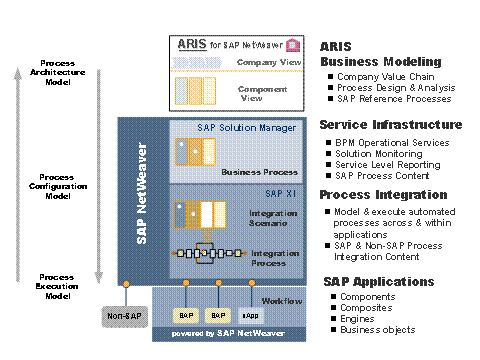
For business modeling, you can use ARIS for SAP NetWeaver. ARIS for SAP NetWeaver provides functions for modeling, designing, analyzing and documenting processes.
The SAP Solution Manager provides you with the relevant SAP reference models. You can create an implementation project using ARIS for SAP NetWeaver and then synchronize it using the SAP Solution Manager. This enables you, for example, to make SAP reference models available in ARIS for SAP NetWeaver, and adapt and enhance them as required. Finally, you can make the implementation project available again in the SAP Solution Manager, where you can then configure the processes and adapt them to your specific system landscape. The SAP Solution Manager also provides you with an extensive range of functions for monitoring your solutions.
For integrating external or legacy systems, you can define integration scenarios and integration processes in SAP NetWeaver. Using SAP Business Workflow, you can automate processes embedded in SAP applications. You can even combine embedded and unbounded processes.
Scenario Variants
The IT scenario consists of the following scenario variants:
Variant |
Description |
Usage and Adaptation of Predefined Content
|
Specifies the use of predefined, adaptable content to model processes at various different levels of abstraction – from the business to the technical view. |
Used to model, configure and automatically execute processes. This can involve application-embedded processes, or unbounded, cross-component processes. |
|
Specifies the combination of application-embedded processes with unbounded, cross-component processes. |
Related Information
The following role-specific guides contain further information about this IT scenario.
User Role and Task |
Guide |
Installation and upgrade |
|
Planning the installation of the IT scenario |
For more information, see the Master Guide - SAP NetWeaver on SAP Service Marketplace at service.sap.com/instguidesnw70 → Installation. |
Planning the upgrade to the IT scenario |
For more information, see the Upgrade Master Guide - SAP NetWeaver on SAP Service Marketplace at service.sap.com/instguidesnw70 → Upgrade. |
Configuration |
SAP Solution
Manager or Technology Consultant’s Guide:
|
Administration
|
Administrator’s Guide:
|
Security |
|
Development |
SAP NetWeaver Developer’s
Guide:
|
 Technology
Consultant's Guide
Technology
Consultant's Guide