 Value Assignment Functions
Use
The following functions are available in characteristic value assignment:
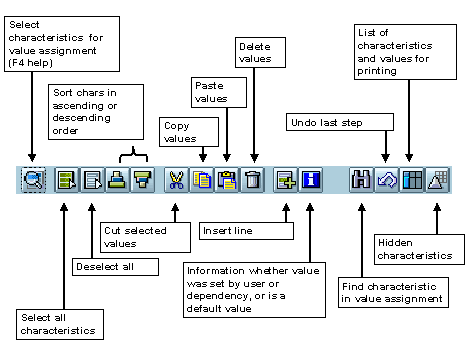
Features
Value assignment functions are used for both classification and finding objects.
Copying Characteristic Values to the Clipboard
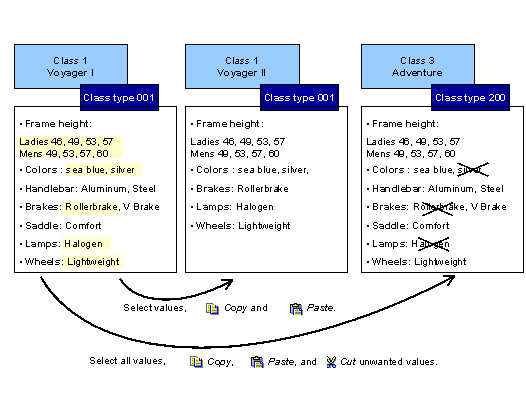
You can copy values to a clipboard and paste them in the same characteristics in either the same class or a different class. This function can be used across different class types, transactions, and sessions. The characteristics must be identical.
If you cut values, they are also saved to the clipboard and can be pasted in again.
When you paste values from the clipboard, the existing values are overwritten and therefore deleted. If you use this function on a multiple-value characteristic, you process all of its values. You cannot select individual values.
 The following example shows three models of bike with the same or similar features. To save time, you can copy characteristic values within the same class or to different classes, provided that the characteristics are identical.
Printing Assigned Values
You can print the values that you assign when you classify an object. If you use object dependencies in classification, you can print the dependencies for characteristics and characteristic values.
Choose

List.
You see a dialog box showing you the characteristics and the values you assigned. If there are object dependencies, you can display the dependencies for characteristics and characteristic values.
To print the list, choose

Print.
Hidden Characteristics
Characteristics and characteristic values are sometimes hidden on the value assignment screen. This can be for the following reasons:
Organizational areas
If the characteristics of a class are assigned to organizational areas, you can restrict the characteristics displayed according to organizational area (for more information, see Choose Organizational Area ).
To do this, choose:

Extras

Organizational areas
 in the classifications.
Characteristics
You can set the
Hidden
indicator either in the characteristic or in the class (by overwriting the characteristic). You do not see the characteristic on the value assignment screen. You can use object dependencies to infer a value for the characteristic.
Dependencies
You can use dependencies to exclude characteristics and characteristic values from the value assignment screen. For example, a precondition can determine whether a characteristic or characteristic value is displayed for value assignment (for more information, see Object Dependencies in Classification ).
To show the characteristics or values that are hidden by object dependencies, choose
Extras
User settings,
then select
With excluded chars.
You see the characteristics on the screen, but you cannot assign or select values.
Inconsistent Characteristic Values
Values can be inconsistent with other values in a class hierarchy or multiple classification.
More under: