
 Action Design

Purpose
In Guided Procedures (GP), actions are executable units that define a single step when implemented in a process template. Each action can refer to either one or two callable objects – one for execution, and an optional one for display. Attaching a callable object to an action is a prerequisite for using it in a process template. The definition of the action adds metadata to the callable object functions, thereby defining how it is invoked and executed within the process.
In the GP design time actions are used to build blocks, which are the basic units of a process template.
Prerequisites
To be able to create and edit actions:
· You must hold the appropriate authorizations for the GP design time. For more information, see Portal Roles.
· You must have launched the gallery. For more information, see Launching Guided Procedures (GP) Design Time.
Process Flow
The process of designing an action consists of the following phases:
● Initially, you define the basic parameters of the action, such as its name, description, location, and so on.
● To make the action functional, you attach at least one callable object to it. In addition to the object that is executed when the action is called, you can attach a callable object that is displayed after the execution.
● Optionally, you can group the input and output parameters of the action, enable it for ad-hoc use, add info callable objects, ad-hoc items, and attachments, and so on.
● Finally, you activate the action.
The process is illustrated in the following figure.
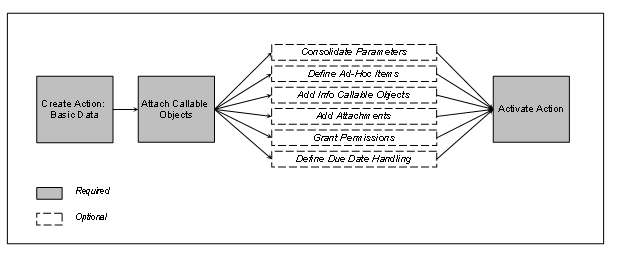
Designing an Action
See also:
Defining and Configuring Notifications
Activating Guided Procedures Content