
 Adjusting a GRMG Customizing File

Use
To monitor the availability of an instrumented application with the GRMG, you must adjust the template of the GRMG Customizing file to the local relationships. For many applications, some of this is done automatically (see Activating and Customizing Monitoring with the GRMG).
You always need to manually adjust the GRMG Customizing file if the automatic adjustment has not run, or has run incompletely. This is the case, for example, in the following situations:
· For an active scenario, if the local relationships change; if, for example, a URL needs to be adjusted after a server is moved
· For applications for which the availability monitoring is not activated using the Visual Administrator or the Extended Configuration Manager (CRM); for which you must therefore perform all Customizing steps manually
· For applications for which the availability monitoring requires logon data (user name and password); in this case, we recommend that you specify this data only in the central monitoring system, since data of this type is protected in transaction GRMG
Exactly which parameters of the Customizing file you must change depends on the monitored application. For more information about this, see the documentation for the application.
There are two ways in which you can make these changes:
· You can make the changes directly in the template of the Customizing file itself, before you load the file into the central monitoring system.
· You can upload the template into the central monitoring system, and then perform the Customizing directly in transaction GRMG.
Prerequisites
The template has already been transferred to the central monitoring system (see Loading a GRMG Customizing File into the Central Monitoring System).
Procedure
1. Call transaction GRMG. The Generic Request and Message Generator screen appears.
2.
Select the desired
scenario and choose  Edit GRMG Customizing.
3. The Edit GRMG Customizing screen now appears. The screen has the following structure:
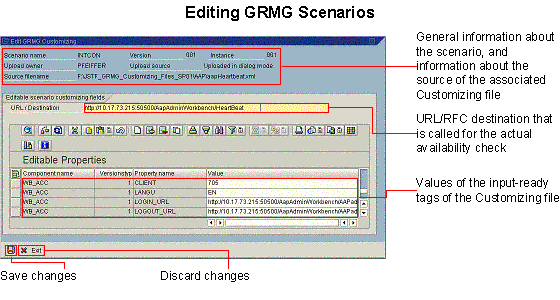
4. In the URL/Destination input field, adjust the URL or the RFC destination of type HTTP. Usually, you only need to change the host name and the port number from the template. For more information, see the documentation for the monitored application.
5. If necessary, adjust the values of the other input-ready parameters.

Ensure that passwords in the editable properties have the type PW. In this way, the passwords are protected against possible access.
In addition to the availability itself, you can also determine the response time of the Web site (see Measuring the Runtime of Availability Monitoring with the GRMG).
6. Save your entries.
You cannot
make more advanced changes to the structure of the Customizing file using Edit GRMG Customizing. Perform the following steps instead in a case of
this type:
§ ...
i.
To download the
Customizing file to your front end, choose  Upload/Download → Download
Scenario..
Upload/Download → Download
Scenario..
ii. Edit the file.
iii.
To upload the
Customizing file to the central monitoring system again, choose Upload/Download → Upload
Scenario.
Result
You have adjusted the Customizing file. To start the availability monitoring, you still need to start the relevant scenario (see Starting GRMG Scenarios).
Example
See GRMG Monitoring of SAP NetWeaver Components
 Monitoring with the
Generic Request and Message Generator start page
Monitoring with the
Generic Request and Message Generator start page