
 Installing SAPOSCOL on a UNIX Host

Prerequisites
You have downloaded the current version of SAPOSCOL as described under Downloading SAPOSCOL.
Procedure
...
1. SAPOSCOL reads areas of the operating system that are normally reserved for kernel processes; SAPOSCOL must therefore run under the root user. To change the user to root, enter the command su root.
2. If an SAP system is running on the host, change to the directory /usr/sap/<SID>/SYS/exe/run. On hosts with no SAP system, you can install SAPOSCOL in any directory.
3. If an older version of SAPOSCOL is already active on your host, stop it using the command saposcol -k and back up the old version with the command cp saposcol saposcol.old.
4.
Copy the new
version of SAPOSCOL:
cp <temp-dir>/saposcol saposcol
5.
Assign the
required authorizations to SAPOSCOL with the commands:
chgrp sapsys saposcol
chmod 4710 saposcol

As SAPOSCOL is running with root authorizations, only users from the group sapsys (such as <sid>adm ) should have access to it. If you are installing SAPOSCOL on hosts with no SAP system, assign the access rights in the same way using a user group (analogous to sapsys).
6. Change back to your original user with the command exit.
7. Start the new SAPOSCOL with the command saposcol.
To ensure that SAPOSCOL was correctly installed, enter the command ls -l saposcol in the directory /usr/sap/<SID>/SYS/exe/run.
The system displays the following line:
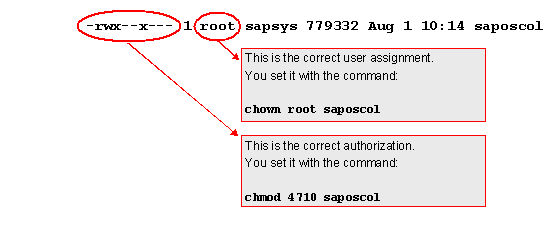
8. If no SAP instance is running on the host, you must ensure yourself that SAPOSCOL is automatically restarted after a restart of the host (for example, by entering the start command in the INITTAB). If there is an SAP instance on the host, SAPOSCOL is contained in the start script.
Result
You have copied the current version of the operating system collector SAPOSCOL to your host and started it there.
See also:
 Operating System
Monitor and Operating System
Collector SAPOSCOL start pages
Operating System
Monitor and Operating System
Collector SAPOSCOL start pages