 Editing and Saving Slides


Editing and Saving Slides
Use
You can edit content objects of info object class Slide in PowerPoint.
You can edit slides that are in the Knowledge Warehouse or Local Repository. The slides are stored in the Local Repository during editing.
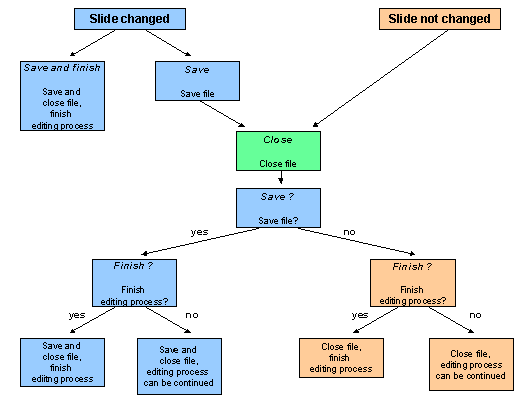
There are the following functions:
Prerequisites
To have access to slides in the Knowledge Warehouse, you must start the Knowledge Workbench in online mode.
Procedure
Select one or more slides and choose Info object → Edit info object(s).
In the structure editor, select a chapter (structure nodes with a lower level) and choose Info object → Edit chapter.
Result
The slide was edited.
It is marked with the following icon: 

When you refresh the display, all the open editing processes are at the beginning of the Info Object List.
You can continue the editing process.