
 Brokered: Service Call at the
Receiver
Brokered: Service Call at the
Receiver

Purpose
In this process, you enhance point-to-point Web service calls by using the Integration Broker as a broker between the Web service client and the service provider. The Integration Broker can forward the Web service call to services from various different systems in a heterogeneous system landscape. The following figure describes this interaction:
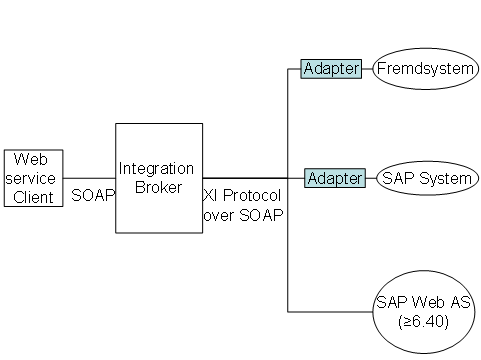
In addition to a service that a provider published as a Web service, you can use the enhanced service-oriented integration variant to call services of a non-SAP or legacy SAP system that cannot otherwise be made available as Web services directly (for example, because they do not support SOAP protocol). By using mapping, the Integration Broker can also call such services whose interface signature is not identical to that of the Web service call. To determine the receiver, you use the routing functions of the Integration Broker.
You call a Web service in the SAPNetWeaver Developer Studio or in the ABAP Workbench. You create a proxy based on a WSDL document. The Web service is called from the application using the generated proxy. Based on the transmitted input parameters, the Web service that is called calculates its output, which is then returned to the caller.
Use of the Process
This IT process is part of the following IT scenario:
IT Scenario |
Scenario Variants |
Prerequisites
You know the required Web service. The URL of the WSDL definition for the Web service is either located locally or determined with the help of the UDDI client, a Web-based tool for searching for UDDI directories.
Process Flow
Whenever services are used, the proxy logic is called in order to create a request message and send it to the service provider. With synchronous processing, the service user can receive the answer message immediately from the service provider.
You use this process to call a service through the standard protocols.
...
1. Calling the proxy
You call a proxy to transfer the parameters of the calling application to the local service.
2. Executing the service
References to the application parameters are used to create a request message. Additional service features, such as reliable messaging or security, are implemented in the message header.
3. Sending the request message
The request message is sent to the service provider through a standard protocol.
4. Service execution at the provider.
See Service Providing.
5. Receiving the response message
A response message is received and processed by the calling application.
Result
When the application is executed, the built-in Web service is called and processed.
See also: