
 Object Design Time
Definition
Object design time provides a set of tools for editing the definitions of the objects that build processes in Guided Procedures (GP).
Use
To access the design time of an object, you must select the relevant object in the gallery, and choose Open….
In the object design time you can:
● display an overview or a detailed view of the object definition
● edit different aspects of the definition.
Structure
The following figure illustrates the tools that the object design time provides.
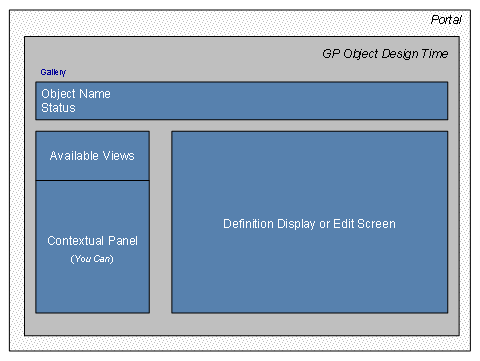
· Object name and status
To be able to use an object in a process, you must activate it first. The version of the object that you edit in the design time is always inactive. GP supports having multiple versions of an object. Each time you activate a newer version, the previous active one becomes deprecated and you cannot use it any more.
· Views
You can display different aspects of the object definition using the available views – for example, overview, or details. You can display the definition of both active and inactive objects.
· Contextual panel
To edit the object definition, you use the functions available in the contextual panel. For example, you can maintain the basic data of the object, such as description and location. If you have activated the object, the system creates a new inactive version.
· Definition display or edit screen
When you choose a view or a function from the contextual panel, the relevant information is displayed in the central frame where you can check or edit the object definition.
For more information about the functions and views that are available in the object design time, see:
·
 Exposing Applications
as Callable Objects (in Developing Composite
Applications with CAF GP)
Exposing Applications
as Callable Objects (in Developing Composite
Applications with CAF GP)