
 Campaign Alerts

Use
During manual and automatic (campaign optimization) campaign planning, the system checks campaign-specific requirements. If the campaign contains errors, the system issues campaign alerts. You can use a correction heuristic to eliminate these campaign alerts.
Prerequisites
PP/DS alert
profile
For the DS planning board to
display campaign alerts, you must maintain a PP/DS alert profile with all
alerts relevant to campaign planning. You then assign this alert profile to
your planning board profile. In the planning board profile, you must also
specify the display mode for the alerts.
For more information, see
 Monitoring PP/DS
Alerts.
Monitoring PP/DS
Alerts.
Features
Campaign Requirements
A production campaign does not contain errors if the following requirements are met:
· The orders of a campaign that are scheduled on the same resource are not interrupted by orders that do not belong to this campaign.
· The setup order is at the beginning of the campaign and the clean-out order is at the end.
Campaign Alert Messages
Depending on the reason for the error, the system issues the following campaign alert messages:
· Campaign interrupted
· Setup or clean-out order lies within a campaign
Campaign Alert Display
Campaign alerts are displayed as follows:
·
In the campaign
transaction, the Campaign
Alerts tab is displayed if alerts exist. On this tab, an alert message is
displayed for each order that causes alerts. At the same time, the  Eliminate Campaign Alerts pushbutton is
visible.
Eliminate Campaign Alerts pushbutton is
visible.
· In the Alert Monitor, all campaign alerts that are within the planning period of the DS planning board are displayed.
· In the DS planning board, the orders start blinking to optically point to campaign alerts.
Activities
Eliminating Campaign Alerts
·
In the campaign
transaction, you choose Eliminate Campaign Alerts. The
system uses the correction heuristic to deallocate the orders causing alerts
and tries to reschedule them according to the settings in the strategy
profile. If rescheduling is not possible, the orders remain
deallocated.

You can use
the /SAPAPO/PCM02_ALERTS Business Add-In to implement your own logic
according to which campaign alerts are eliminated.
To implement this BAdI, go to Customizing for Production Planning and
Detailed Scheduling (PP/DS) and choose Business
Add-In → Eliminate Campaign
Alerts.
· In the DS planning board, you must remove the orders causing the alerts from the campaign using drag and drop and reschedule them. In addition, you can start a new optimization run with campaign optimization. During optimization, the system may be able to eliminate some of the campaign alerts.
Example
The following example illustrates how you can correct campaigns with errors in the DS planning board.
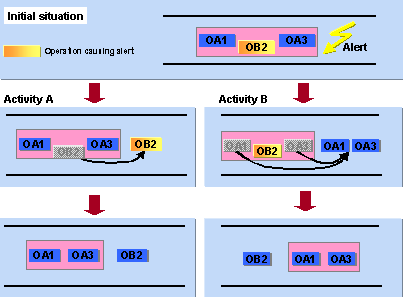
Initial
situation:
A campaign consisting of operations OA1 an OA3 lies within the planning
period. Another operation (OB2) was scheduled between these operations.
However, it does not belong to the campaign and therefore causes the
Campaign interrupted campaign alert:
( OA1 OB2Alert OA3 )
Activity:
You can eliminate the
campaign alert by first removing individual operations from the campaign and
then rescheduling them. You can choose between the following two
options:
·
Activity A
You use Drag&Drop to move
operation OB2Alert to a
date after the campaign. The campaign itself is not moved on the time axis but
the system can modify the campaign as follows
¡
It pushes
operations OA1 and OA3 closer together.
â ( OA1 OA3 )
OB2Alert
¡
It keeps the
distance between OA1 and OA3.
â ( OA1 ___ OA3 )
OB2Alert
·
Activity B
You leave operation
OB2Alert where it is,
and instead use Drag&Drop to move operations OA1 and OA3 to a date after
VB2Alert . The system automatically moves the campaign bar in
parallel to the operations.
â OB2Alert (OA1 OA3 )
The campaign alert Campaign interrupted disappears in both cases. Note, however, that new alerts may be caused as a result of rescheduling.