 Area Menu
The area menu is located on the left-hand side of the Web Administration Interface and is divided into subareas.
Core System
The core system contains the runtime environment and infrastructure, and is used by both the Web dispatcher and the Internet Communication Manager (ICM).
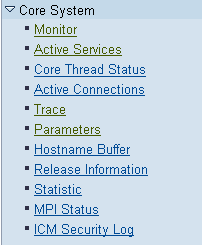 (Core System Menu)
This submenu contains the following areas:
Area |
Function |
|---|---|
Monitor |
Overview of existing worker threads More information: Architecture of the Internet Communication Manager (ICM) |
Core Thread Status |
Overview of the central threads (in contrast to worker threads that process connections). |
Active Services |
Monitors, starts, and deactivates active services (ports). Changes however are lost when system is restarted. To make permanent changes use profile parameter icm/server_port_<xx>. |
Active Connections |
Connections currently active. |
Trace |
Displays, resets, downloads trace file. Sets trace level |
Parameters |
Displays values of profile parameters in the ICM/Web dispatcher environment. |
Host Name Buffer |
Displays values of the Host Name Buffer, and resets the buffer. |
Release Information |
Displays release notes |
Statistics |
Displays statistics |
MPI Status |
Displays status of MPI communication buffer. |
ICM Security Log |
Settings for security log, display of log file More information: icm/security_log |
HTTP Handler
This area contains the functions of the HTTP handler that is part of both the ICM and Web dispatcher.
 Note
Note
You can only make changes in this menu if you access the Web admin interface with a user from group admin. You can ascertain whether you have this administration authorization beneath the area menu (Admin rights granted) or in the user overview (admin handler, see below).
More information: Creating Administration Users (use command line)
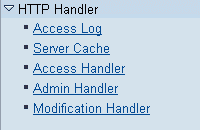 (HTTP Handler Menu)
Area |
Function |
|---|---|
Access Log |
Displays parameters and protocol file. |
Server Cache |
Displays parameterization and cache entries. |
Access Handler |
Configuration of access restrictions; see icm/HTTP/auth_<xx>. |
Admin Handler |
Display, create, change, and delete administration and monitoring users for the Web admin interface. You can see where the file is in which the user data is defined. To create and mange users choose Change Users in the context menu (right mouse button). |
Modification Handler |
You can see where the rules for modifying HTTP requests are defined. Modifications are used, or instance, to manipulate header fields, filter requests, and rewrite URLS. More information: Modification of HTTP Requests |
Dispatching Module
The dispatching module is the part of the SAP Web Dispatcher that selects the application server. The server is selected depending on the protocol, configuration, load balancing procedure, and so on.
The Web admin interface of an SAP Web dispatcher still contains the following areas on the left-hand side:
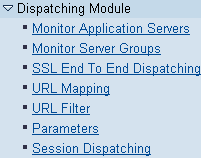 (Dispatching Module Menu)
Area |
Function |
|---|---|
Monitor Application Servers |
Displays current application servers in the system, divided into ABAP and Java (tab pages ABAP and JAVA). Instances that provide both appear in both views. The following information is displayed for each instance:
|
Monitor Server Groups |
Display of the current server groups for ABAP, JEE, display of response times, server accessibility, load factor. With the context menu (right mouse button) you can deactivate and reactivate application servers here also. Inactive servers do not get any requests from the Web dispatcher. You can also sent ping requests (HTTP and HTTPS) to each server. More information: Server Selection and Load Balancing Using the SAP Web Dispatcher |
SSL End To End Dispatching |
Parameterization and display of the entries in the client IP table. More information: End-to-End SSL |
URL Mapping |
Display of the URL mapping table More information: Architecture and Functions of the SAP Web Dispatcher |
URL Filter |
URL filter settings. More information: SAP Web Dispatcher as a URL Filter |
Parameters |
Display of parameters specific to Web Dispatcher. More information: Parameterization of the SAP Web Dispatcher |
Session Dispatching |
Details about session dispatching (default setting is deactivated). More information: Determining the Server Group |
 (Capacity)
 Note
If you have configured the Web Dispatcher for multiple systems, a number of menu entries are listed for each system. For an example of this, refer to SAP Web Dispatcher for Multiple Systems.