 Application Logoff Page
If an application is closed by an Exit Plug, and no other application is started, the Web Dynpro Framework sends a standard logoff page to the browser. This is entered in the Web Dynpro service node (/default_host/sap/bc/webdynpro). The Web Dynpro node is the parent node of all Web Dynpro ABAP applications you create.
 (Web Dynpro Nodes in SICF)
If you want to now use your own logoff page for your application, you can overwrite this standard page on the subnode of your application.
To do this go to the service node of your application in SICF and enter your own data under  Error Pages
  Logoff Pages
  . You can enter your text on this screen or go to another page.
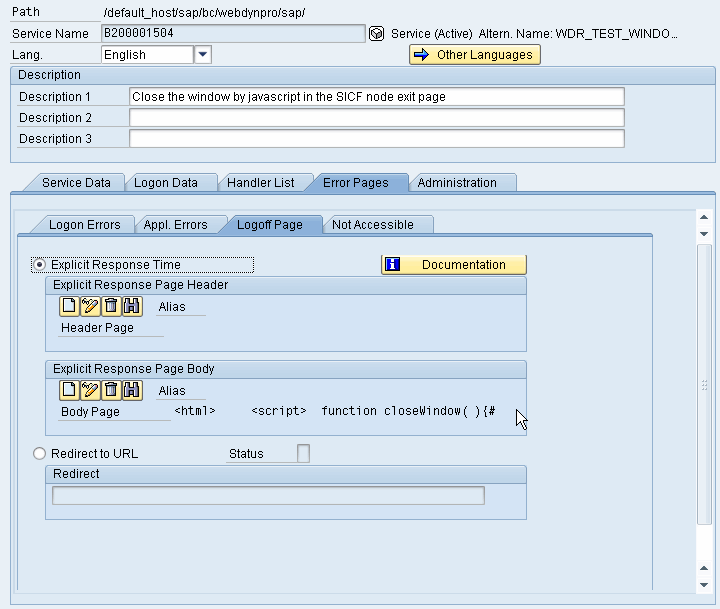 (Example of a Logoff Page)
Closing the Browser Window After Application Closes
Along with being able to set up your own logoff page for a service node, you can also close the browser window using JavaScript on this logoff page.
 Note
Note
How the JavaScript functions depends on the browser you are using.
You can find information about which browsers SAP supports for Web Dynpro ABAP under http://service.sap.com/pam.
If the window you want to close is not the last browser window, then the JavaScript function works in the Internet Explorer and in Netscape. If the window you want to close is the last window, when the JavaScript function is called a popup is sent to ask you if you really want to carry out this action. In Netscape the function is executed without a further prompt.
 Syntax
<html>
<script>
function closeWindow( ){top.close( );
}
</script>
<body>
<form>The application was successfully closed <br>
<input type="button" value="close window" onclick="closeWindow( );" />
</form>
</body>
</html>
Deleting the Authentication in Logoff
Note
The following only applies when the SSO cookie was not set with HttpOnly by the server.
When you log off from some applications, the authentication of the user may also have to be reset in the browser, which means that a new authentication is needed when the application is called again. If basic authentication is used for the logon, this information can only be deleted in the browser with Internet Explorer 6.0 SP1 and higher. The folowing JavaScript function is called for this:
Syntax
document.execCommand( 'ClearAuthenticationCache' );
If an SSO2 cookie is used for the authentication, you can delete the cookie with JavaScript:
Syntax
function DelSso2Cookie(sName,sPath)
{var sso2Domain = location.hostname;
if (location.hostname.indexOf(".")>0)sso2Domain = location.hostname.substr(location.hostname.indexOf(".")+1);p="";
if(sPath)p=" path="+sPath+";";
document.cookie = sName+"=0; expires=Fri, 31 Dec 1999 23:59:59 GMT;"+p + "domain="+sso2Domain+";";
}
You can also include this JavaScript in logoff pages.
 Caution
We strongly recommend that you do not delete the cookie. In particular, when the cookie is deleted from the portal, the logon to the portal is also deleted, and the user has to log on again.