 Creating Composite Applications
The scenario variant for developing, configuring, and adapting applications with SAP Composite Application Framework (CAF) includes the core component Composite Application Framework (CAF Core) and the workflow-oriented CAF Guided Procedures (CAF GP). Together they aim to provide an ESA-compliant comprehensive application programming model for composite application creation with a common UI framework.
This subsection of the SAP NetWeaver Technical Operations Manual (TOM) describes the maintenance and administrative tasks required to implement the IT scenario variant for creating composite applications and to keep it running smoothly.
For more information and a scenario variant description, see Creating Composite Applications.
Getting Started
Essentially, all tasks of maintaining the CAF solution depend on the respective tasks for the SAP NetWeaver Application Server and Portal components.
For more information about these usage types, see AS Java and Portal.
Technical System Landscape
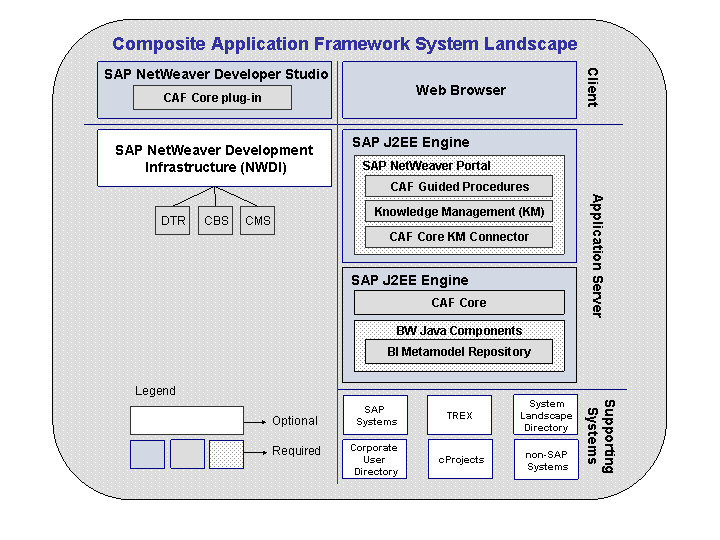
In the following figure, you can see the CAF system landscape in relation to other SAP NetWeaver components. You see the division between the required client applications, for example a web browser and the CAF Core plug-in to the SAP NetWeaver Developer Studio, to other required application server components such as KM, SAP NetWeaver Portal and optionally, CAF GP.
Tools
The following table lists the tools used for the administration of CAF Core and CAF GP tasks.
Tool |
For Which Task |
Description |
Configure Endpoint-Aliases Transport GP-Objects Set authorizations |
Powerful administration tool for CAF GP issues. Part of the Guided Procedures framework. |
|
Supports several administrative tasks. |
CAF GP Plug-In for the SAP NetWeaver Administrator. |
|
Log Viewer within SAP J2EE Visual Administrator |
Trace and log file analysis and optimized trace and log file configuration. |
Used to analyze trace and log files generated by CAF Core during problem situations. |
Tasks
Affected Processes
The following processes of variant Creating Composite Applications are affected by administrative tasks:
Modeling a Composite Application
Configuring a Composite Application
Adapting a Composite Application
Process Steps and Administrative Tasks
The following table lists the tasks administrators need to be perform in order to keep CAF Core and CAF GP running optimally. A more detailed description either follows the table or you will be provided a link to other SAP NetWeaver documentation.
Task |
Tool to Use |
Explanation |
Trace and log file optimization in CAF Core |
SAP J2EE Visual Administrator Log Viewer |
To attain the most useful information from logs and traces when necessary, some application properties need to be adjusted. See CAF Core Analysis Tools for more information. |
View log files |
SAP J2EE Visual Administrator Log Viewer |
All traces are simple text file. The Log Viewer tool, as provided by the Visual Administrator, parses trace files in order to separate various fields such as thread ID, user, message and provides some other functionality such as search, filters, etc. See CAF Core Analysis Tools for more information. |
Monitor CAF Core |
CCMS |
The monitoring concept available for CAF Core with CCMS is based on the Generic Request and Message Generator (GRMG) and serves a "heartbeat" monitor used to test a chain of components for availability in a J2EE server or in the Web Application Server (Web AS). See Configuring CAF Availability Monitoring for more information. |
Configure Endpoint-Aliases |
Administration Workset |
For connectivity with SAP systems and the Business Workflow, you have to configure Endpoints. For more information, see Configuring Endpoint Aliases. |
Import GP objects |
Administration Workset |
You can use GP objects from other users and SAP systems by importing them into your GP framework. For more information, see: |
Monitor activated GP objects |
GP Monitor |
The monitoring of activated GP objects gives you detailed insight about the Guided Procedures Design time. For more information, see Activated Templates. |
Set or change process authorizations |
Administration Workset (Process Instance Manager) GP Monitor |
The Process Instance Manager (as part of the Administration workset) enables you to change the standard process roles of GP processes (process instances) running in the Guided Procedures runtime. Use the GP Monitor for more detailed information about the process instances. For more information, see Process Instances. |
Adapt authorizations |
Administration Workset (Process Instance Manager) GP Monitor |
See above. |