
 Importing a Web Service in Guided
Procedures
Importing a Web Service in Guided
Procedures

Use
Web services are self-contained, modularized, executable entities that can be published, searched for, and accessed across a network. For a caller or sender, a Web service is a black box that may require input and delivers a result.
The Guided Procedures (GP) framework enables you to import any Web service, thus allowing you to reuse the modules you have implemented in your system without having to modify their implementation.
The procedure below shows you how to create a Web service callable object that is used to start a GP process.
Prerequisites
· You have acquainted yourself with Exposing Web Services as Callable Objects.
· You have created and configured a logical destination, for example Exposing, for the Web service callable object.

Make sure you enter http://<host>:<port>/gpcore/GPProcessDiscoveryWSIL/inspection.wsil for the direct link to the servlet generating the WSIL file.
More information:
 Configuring
Destinations for WS Callable Objects
Configuring
Destinations for WS Callable Objects
Procedure
...
1. Open the gallery and choose Create Callable Object from the contextual panel.
2. Enter the required basic data as follows:
¡ Type – choose Services → Web Service
¡ Name – enter a name that is used to distinguish the callable object in the gallery; for example, Start a Process
¡ Description – describe the callable object by entering a brief description; for example, Start a Process
¡ Original Language – choose English
¡ Folder – Select a folder in the gallery where the callable object definition is stored
3. To open the Define Object screen, choose Next.
4. Choose Logical Destination and then Select.

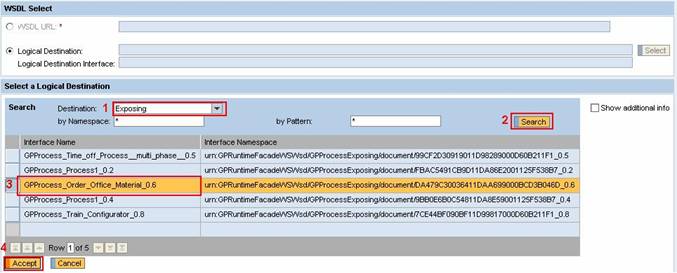
5. On the Select a Logical Destination screen, make the following configurations:
a. From the Destination dropdown box, select Exposing.
b. Choose Search.
A list with interfaces of the Exposing destination appears.
c. From the interface list, select GPProcess_Order_Office_Material_0.6, for example.
d. ChooseAccept.
6. On the Web Service Properties screen do the following:
a. From the Interface Port Name dropdown box, select GPProcessExposingPort_Document.
b. From the available operations listed under GPProcess_Order_Office_Material_0.6, select StartProcess.
The operation parameters are displayed in the right-hand part of the screen.

7. To open the Define Input screen, choose Next
The input parameters of the Web service are automatically detected.
8. To open the Define Output screen, choose Next.
The output parameters of the Web service are automatically detected
9. To complete the procedure, choose Next, and then Finish and Open.
Result
You have exposed the Web service as a callable object. Now you can test and activate it.