
 Changing the TREX Host Name of the Master Name
Server
Changing the TREX Host Name of the Master Name
Server

You want to change the host name of the master name server. You have to do the following:
● Change the TREX configuration files
The process flow for the configuration depends on the type of data storage that you have chosen for your distributed landscape:
○ Process flow for decentralized storage
○ Process flow for centralized storage
● Change the profile settings.
Prerequisites
You have stopped TREX on all hosts.
Change the TREX configuration files
Process Flow for Decentralized Data Storage
...
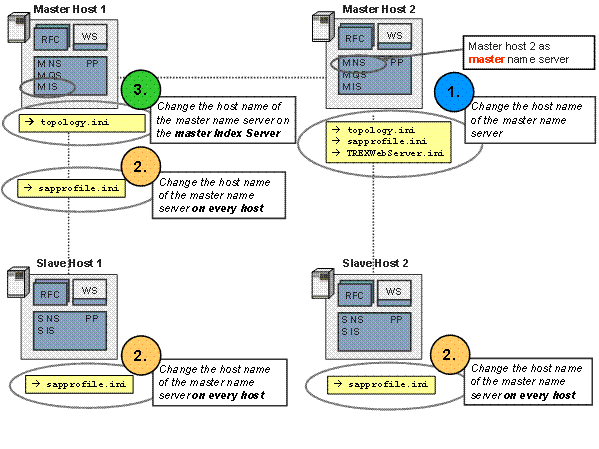
1. Change the host name of the master name server on the host of the master name server.
For decentralized data storage, you first change the host name of a master name server in the configuration files topology.ini, sapprofile.ini and TREXWebServer.ini(if the Web server was installed) on the host with the master name server.
2. Change the host name of the master name server on each host in your landscape.
Then you change the host name of this master name server in all sapprofile.ini files on each host in your distributed landscape
3. Change the host name of the master name server on the master index server.
Finally you change the host name of the master name server in the topology.ini files of the master index servers.
Example Scenario
Procedure
...
...
1. Change the host name of the master name server.
a. Change the file <TREX_INSTANCE>\topology.ini on this TREX host with the master name server.
■ You have to change the TREX host name in several places in the configuration file topology.ini (for example: <host>, url=, user=, sap_retrieval_path=).
■ Open the file, search for your old TREX host name, replace it with <new_trex_hostname>and save the file.
b. Change the file <TREX_INSTANCE>\sapprofile.ini on this TREX host with the master name server. Change the old TREX host name to the new TREX host name <new_trex_host name> in the configuration file sapprofile.ini. Change the line #SAPLOCALHOST= to SAPLOCALHOST=<new_trex_host name>.

You have to remove the sign # in front of SAPLOCALHOST so that the command SAPLOCALHOST can be executed.
c. Change the old TREX host name to <new_trex_hostname> in the file <TREX_INSTANCE>\TREXWebServer.ini.

You have to change the file TREXWebServer.ini only if you have installed the Web server. Navigate to the section [HTTPSERVER] and replace the old TREX host name: URL=http://<new_trex_hostname>.<URL>:....
2. Change the host name of the master name server on each host in your landscape.
Change the file <TREX_INSTANCE>\sapprofile.ini on all hosts in your TREX landscape. The host names of all master name servers in a TREX landscape are listed in the file sapprofile.ini on each host of your landscape.

# TREX-NameServer
. . .
TREX/NameServer/Master=pwdf2832:30001 pwdf2833:30101 pwdf2834:30201
Replace the old host name of the master name server in your TREX landscape in this list with the new host name. You have to do this on each host in your landscape.
3. Change the host name of the master name server on the master index server.
Change the old TREX host name to <new_trex_hostname> in the file <TREX_INSTANCE>\topology.ini of the master index server.
○ You have to do this in the configuration file topology.ini on all master hosts (TREX hosts with the role of master index server) in your distributed TREX landscape.
○ You have to change the TREX host name in several places in the file topology.ini (for example: <host>, url=, user=, sap_retrieval_path=).
Overview of TREX Configuration Files to Be Changed
|
Host |
topology.ini |
sapprofile.ini |
TREXWebServer.ini |
1. |
Master host 2 as master name server |
change old host name to new host name |
change old host name to new host name |
change old host name to new host name |
2. |
Slave host 1 |
--------------- |
# TREX-NameServer change the host name of the master name server |
|
2. |
Slave host 2 |
--------------- |
# TREX-NameServer change the host name of the master name server |
|
3. |
Master host 1 |
change old host name to new host name |
# TREX-NameServer change the host name of the master name server |
|
Master host = host with the role of master index server
Slave host = host with the role of slave index server
Backup host = host with the role of backup index server
Process Flow for Centralized Data Storage
...
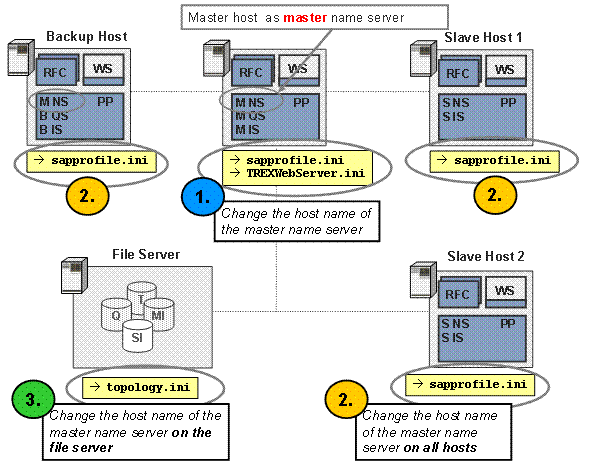
1. Change the host name of the master name server on the host of the master name server.
For centralized data storage, you first change the host name of a master name server in the configuration files sapprofile.ini and TREXWebServer.ini (if Web server was installed) on the host with the master name server.
2. Change the host name of the master name server on each host in your landscape.
Then you change the host name of this master name server in all sapprofile.ini files on each host in your distributed landscape.
3. Change the host name of the master name server on the central file server.
Finally you change the host name of the master name server once in the topology.ini file which is stored centrally on the file server.
Example Scenario
Procedure
..
1. Change the host name of the master name server on the host of the master name server.
a. Change the file <TREX_INSTANCE>\sapprofile.ini on the TREX host with the master name server. Change the old TREX host name to the new TREX host name <new_trex_host name> in the configuration file sapprofile.ini. Change the line #SAPLOCALHOST= to SAPLOCALHOST=<new_trex_host name>.
You have to remove the sign # in front of SAPLOCALHOST so that the command SAPLOCALHOST can be executed.
b. Change the old TREX host name to <new_trex_hostname> in the file <TREX_INSTANCE>\TREXWebServer.ini.
You have to change the file TREXWebServer.ini only if you have installed the Web server.
Navigate to the section [HTTPSERVER] and replace the old TREX host name: URL=http://<new_trex_hostname>.<URL>:....
2. Change the host name of the master name server on each host in your landscape.
Change <TREX_INSTANCE>\sapprofile.ini on all hosts in your TREX landscape. The host names of all master name servers of a TREX landscape are listed in the file sapprofile.ini on each host in your landscape.
# TREX-NameServer
. . .
TREX/NameServer/Master=pwdf2832:30001 pwdf2833:30101 pwdf2834:30201
Replace the old host name of the master name server of your TREX landscape in this list with the new host name. You have to do this on every host of your landscape.
3. Change the host name of the slave name server on the central file server.
Change the old TREX host name to <new_trex_hostname> in the file <TREX_INSTANCE>\topology.ini on the central file server.
○ You have to do this once in the configuration filestopology.ini on the file server in your distributed TREX landscape. In the topology.ini files, the host names of all the slave name servers in your TREX landscape are listed.
○ You have to change the TREX host name in several places in the file topology.ini (for example: <host>, url=, user=, sap_retrieval_path=).
Overview of TREX Configuration Files to Be Changed
Host |
sapprofile.ini |
TREXWebServer.ini |
topology.ini |
Master host as master name server |
Change the old host name to new host name |
# TREX-Name Server Change the host names of the master name servers |
--------------- |
Slave host 1 |
Change the old host name to the new host name |
--------------- |
--------------- |
Slave host 2 |
Change the old host name to the new host name |
--------------- |
--------------- |
Backup host |
Change the old host name to the new host name |
--------------- |
--------------- |
File server |
--------------- |
--------------- |
Change the old host name to the new host name |
Master host = host with the role of master index server
Slave host = host with the role of slave index server
Backup host = host with the role of backup index server
File server = server for the centrally stored data
Change the profiles settings
After changing the TREX configuration files you change the profile settings as described in Changing the Profile Settings.
Result
You have changed the TREX host name for the master name server. You now can restart TREX.